分组 (Group by): 拆分-应用-合并#
我们所说的“分组 (group by)”是指一个或多个以下步骤的过程
根据某些标准将数据拆分成组。
独立地对每个组应用一个函数。
将结果合并成一个数据结构。
其中,拆分步骤是最直接的。在应用步骤中,我们可能希望执行以下操作之一
聚合:为每个组计算一个或多个汇总统计量。一些例子
计算组总和或均值。
计算组大小/计数。
转换:执行一些组特定计算并返回一个索引相似的对象。一些例子
在组内标准化数据(zscore)。
用从每个组导出的值填充组内的 NA 值。
过滤:根据对组的计算结果为 True 或 False 来丢弃某些组。一些例子
丢弃只有少数成员的组中的数据。
根据组总和或均值过滤数据。
许多这些操作是在 GroupBy 对象上定义的。这些操作类似于聚合 API、窗口 API 和重采样 API 中的操作。
一个给定的操作可能不属于这些类别之一,或者它们是它们的某种组合。在这种情况下,可以使用 GroupBy 的 apply 方法来计算该操作。如果应用步骤的结果不符合上述三个类别中的任何一个,此方法将检查这些结果并尝试将它们合理地组合成一个单一结果。
注意
使用内置 GroupBy 操作将一个操作分解为多个步骤,会比使用用户定义的 Python 函数的 apply 方法更高效。
对于使用过基于 SQL 的工具(或 itertools)的人来说,GroupBy 这个名称应该非常熟悉,在其中你可以编写如下代码
SELECT Column1, Column2, mean(Column3), sum(Column4)
FROM SomeTable
GROUP BY Column1, Column2
我们旨在使这类操作使用 pandas 表达起来自然而简单。我们将介绍 GroupBy 功能的各个方面,然后提供一些非平凡的示例/用例。
有关一些高级策略,请参阅实用指南。
将对象拆分为组#
分组的抽象定义是提供标签到组名称的映射。要创建 GroupBy 对象(稍后会详细介绍 GroupBy 对象是什么),您可以执行以下操作
In [1]: speeds = pd.DataFrame(
   ...:     [
   ...:         ("bird", "Falconiformes", 389.0),
   ...:         ("bird", "Psittaciformes", 24.0),
   ...:         ("mammal", "Carnivora", 80.2),
   ...:         ("mammal", "Primates", np.nan),
   ...:         ("mammal", "Carnivora", 58),
   ...:     ],
   ...:     index=["falcon", "parrot", "lion", "monkey", "leopard"],
   ...:     columns=("class", "order", "max_speed"),
   ...: )
   ...:

In [2]: speeds
Out[2]:
          class           order  max_speed
falcon     bird   Falconiformes      389.0
parrot     bird  Psittaciformes       24.0
lion     mammal       Carnivora       80.2
monkey   mammal        Primates        NaN
leopard  mammal       Carnivora       58.0

In [3]: grouped = speeds.groupby("class")

In [4]: grouped = speeds.groupby(["class", "order"])
映射可以通过多种方式指定
一个 Python 函数,将被调用到每个索引标签上。
一个与索引长度相同的列表或 NumPy 数组。
一个字典或
Series,提供标签 -> 组名称的映射。对于
DataFrame对象,一个字符串,指示要用于分组的列名或索引级别名称。以上各项的列表。
我们统称分组对象为键。例如,考虑以下 DataFrame
注意
传递给 groupby 的字符串可以引用列或索引级别。如果字符串同时匹配列名和索引级别名,将引发 ValueError。
In [5]: df = pd.DataFrame(
   ...:     {
   ...:         "A": ["foo", "bar", "foo", "bar", "foo", "bar", "foo", "foo"],
   ...:         "B": ["one", "one", "two", "three", "two", "two", "one", "three"],
   ...:         "C": np.random.randn(8),
   ...:         "D": np.random.randn(8),
   ...:     }
   ...: )
   ...:

In [6]: df
Out[6]:
     A      B         C         D
0  foo    one  0.469112 -0.861849
1  bar    one -0.282863 -2.104569
2  foo    two -1.509059 -0.494929
3  bar  three -1.135632  1.071804
4  foo    two  1.212112  0.721555
5  bar    two -0.173215 -0.706771
6  foo    one  0.119209 -1.039575
7  foo  three -1.044236  0.271860
在 DataFrame 上,我们通过调用 groupby() 获取一个 GroupBy 对象。此方法返回一个 pandas.api.typing.DataFrameGroupBy 实例。我们自然可以按 A 或 B 列或两者进行分组
In [7]: grouped = df.groupby("A")

In [8]: grouped = df.groupby("B")

In [9]: grouped = df.groupby(["A", "B"])
注意
df.groupby('A') 只是 df.groupby(df['A']) 的语法糖。
如果我们在列 A 和 B 上也有 MultiIndex,我们可以按除我们指定列之外的所有列进行分组
In [10]: df2 = df.set_index(["A", "B"])

In [11]: grouped = df2.groupby(level=df2.index.names.difference(["B"]))

In [12]: grouped.sum()
Out[12]:
            C         D
A
bar -1.591710 -1.739537
foo -0.752861 -1.402938
上述 GroupBy 将根据其索引(行)拆分 DataFrame。要按列拆分,首先进行转置
In [13]: def get_letter_type(letter):
   ....:     if letter.lower() in 'aeiou':
   ....:         return 'vowel'
   ....:     else:
   ....:         return 'consonant'
   ....:

In [14]: grouped = df.T.groupby(get_letter_type)
pandas Index 对象支持重复值。如果非唯一索引用作分组操作中的组键,则相同索引值的所有值将被视为属于一个组,因此聚合函数的输出将仅包含唯一索引值
In [15]: index = [1, 2, 3, 1, 2, 3]

In [16]: s = pd.Series([1, 2, 3, 10, 20, 30], index=index)

In [17]: s
Out[17]:
1     1
2     2
3     3
1    10
2    20
3    30
dtype: int64

In [18]: grouped = s.groupby(level=0)

In [19]: grouped.first()
Out[19]:
1    1
2    2
3    3
dtype: int64

In [20]: grouped.last()
Out[20]:
1    10
2    20
3    30
dtype: int64

In [21]: grouped.sum()
Out[21]:
1    11
2    22
3    33
dtype: int64
请注意,直到需要时才会发生拆分。创建 GroupBy 对象仅验证您是否传递了有效的映射。
注意
许多复杂的数据操作都可以用 GroupBy 操作来表达(尽管不能保证是最有效的实现)。您可以通过标签映射函数发挥创意。
GroupBy 排序#
默认情况下,组键在 groupby 操作期间会进行排序。但是,您可以传递 sort=False 以提高潜在的速度。使用 sort=False 时,组键之间的顺序遵循键在原始 DataFrame 中出现的顺序
In [22]: df2 = pd.DataFrame({"X": ["B", "B", "A", "A"], "Y": [1, 2, 3, 4]})

In [23]: df2.groupby(["X"]).sum()
Out[23]:
   Y
X
A  7
B  3

In [24]: df2.groupby(["X"], sort=False).sum()
Out[24]:
   Y
X
B  3
A  7
请注意,groupby 将保留每个组内观测值的排序顺序。例如,下面 groupby() 创建的组的顺序与它们在原始 DataFrame 中出现的顺序一致
In [25]: df3 = pd.DataFrame({"X": ["A", "B", "A", "B"], "Y": [1, 4, 3, 2]})

In [26]: df3.groupby("X").get_group("A")
Out[26]:
   X  Y
0  A  1
2  A  3

In [27]: df3.groupby(["X"]).get_group(("B",))
Out[27]:
   X  Y
1  B  4
3  B  2
GroupBy dropna#
默认情况下,在 groupby 操作期间,NA 值会从组键中排除。但是,如果您想在组键中包含 NA 值,您可以传递 dropna=False 来实现。
In [28]: df_list = [[1, 2, 3], [1, None, 4], [2, 1, 3], [1, 2, 2]]

In [29]: df_dropna = pd.DataFrame(df_list, columns=["a", "b", "c"])

In [30]: df_dropna
Out[30]:
   a    b  c
0  1  2.0  3
1  1  NaN  4
2  2  1.0  3
3  1  2.0  2
# Default ``dropna`` is set to True, which will exclude NaNs in keys
In [31]: df_dropna.groupby(by=["b"], dropna=True).sum()
Out[31]:
     a  c
b
1.0  2  3
2.0  2  5

# In order to allow NaN in keys, set ``dropna`` to False
In [32]: df_dropna.groupby(by=["b"], dropna=False).sum()
Out[32]:
     a  c
b
1.0  2  3
2.0  2  5
NaN  1  4
dropna 参数的默认设置为 True,这意味着 NA 不会包含在组键中。
GroupBy 对象属性#
groups 属性是一个字典,其键是计算出的唯一组,对应的值是属于每个组的轴标签。在上面的例子中,我们有
In [33]: df.groupby("A").groups
Out[33]: {'bar': [1, 3, 5], 'foo': [0, 2, 4, 6, 7]}

In [34]: df.T.groupby(get_letter_type).groups
Out[34]: {'consonant': ['B', 'C', 'D'], 'vowel': ['A']}
对 GroupBy 对象调用标准 Python len 函数会返回组的数量,这与 groups 字典的长度相同
In [35]: grouped = df.groupby(["A", "B"])

In [36]: grouped.groups
Out[36]: {('bar', 'one'): [1], ('bar', 'three'): [3], ('bar', 'two'): [5], ('foo', 'one'): [0, 6], ('foo', 'three'): [7], ('foo', 'two'): [2, 4]}

In [37]: len(grouped)
Out[37]: 6
GroupBy 将通过制表符完成列名、GroupBy 操作和其他属性
In [38]: n = 10

In [39]: weight = np.random.normal(166, 20, size=n)

In [40]: height = np.random.normal(60, 10, size=n)

In [41]: time = pd.date_range("1/1/2000", periods=n)

In [42]: gender = np.random.choice(["male", "female"], size=n)

In [43]: df = pd.DataFrame(
   ....:     {"height": height, "weight": weight, "gender": gender}, index=time
   ....: )
   ....:

In [44]: df
Out[44]:
               height      weight  gender
2000-01-01  42.849980  157.500553    male
2000-01-02  49.607315  177.340407    male
2000-01-03  56.293531  171.524640    male
2000-01-04  48.421077  144.251986  female
2000-01-05  46.556882  152.526206    male
2000-01-06  68.448851  168.272968  female
2000-01-07  70.757698  136.431469    male
2000-01-08  58.909500  176.499753  female
2000-01-09  76.435631  174.094104  female
2000-01-10  45.306120  177.540920    male

In [45]: gb = df.groupby("gender")
In [46]: gb.<TAB>  # noqa: E225, E999
gb.agg        gb.boxplot    gb.cummin     gb.describe   gb.filter     gb.get_group  gb.height     gb.last       gb.median     gb.ngroups    gb.plot       gb.rank       gb.std        gb.transform
gb.aggregate  gb.count      gb.cumprod    gb.dtype      gb.first      gb.groups     gb.hist       gb.max        gb.min        gb.nth        gb.prod       gb.resample   gb.sum        gb.var
gb.apply      gb.cummax     gb.cumsum     gb.fillna     gb.gender     gb.head       gb.indices    gb.mean       gb.name       gb.ohlc       gb.quantile   gb.size       gb.tail       gb.weight
带 MultiIndex 的 GroupBy#
对于分层索引数据,按层次结构中的一个级别进行分组是很自然的。
让我们创建一个带有两级 MultiIndex 的 Series。
In [47]: arrays = [
   ....:     ["bar", "bar", "baz", "baz", "foo", "foo", "qux", "qux"],
   ....:     ["one", "two", "one", "two", "one", "two", "one", "two"],
   ....: ]
   ....:

In [48]: index = pd.MultiIndex.from_arrays(arrays, names=["first", "second"])

In [49]: s = pd.Series(np.random.randn(8), index=index)

In [50]: s
Out[50]:
first  second
bar    one      -0.919854
       two      -0.042379
baz    one       1.247642
       two      -0.009920
foo    one       0.290213
       two       0.495767
qux    one       0.362949
       two       1.548106
dtype: float64
然后我们可以根据 s 中的一个级别进行分组。
In [51]: grouped = s.groupby(level=0)

In [52]: grouped.sum()
Out[52]:
first
bar   -0.962232
baz    1.237723
foo    0.785980
qux    1.911055
dtype: float64
如果 MultiIndex 有指定的名称,可以传递这些名称而不是级别编号
In [53]: s.groupby(level="second").sum()
Out[53]:
second
one    0.980950
two    1.991575
dtype: float64
支持多级别分组。
In [54]: arrays = [
   ....:     ["bar", "bar", "baz", "baz", "foo", "foo", "qux", "qux"],
   ....:     ["doo", "doo", "bee", "bee", "bop", "bop", "bop", "bop"],
   ....:     ["one", "two", "one", "two", "one", "two", "one", "two"],
   ....: ]
   ....:

In [55]: index = pd.MultiIndex.from_arrays(arrays, names=["first", "second", "third"])

In [56]: s = pd.Series(np.random.randn(8), index=index)

In [57]: s
Out[57]:
first  second  third
bar    doo     one     -1.131345
               two     -0.089329
baz    bee     one      0.337863
               two     -0.945867
foo    bop     one     -0.932132
               two      1.956030
qux    bop     one      0.017587
               two     -0.016692
dtype: float64

In [58]: s.groupby(level=["first", "second"]).sum()
Out[58]:
first  second
bar    doo      -1.220674
baz    bee      -0.608004
foo    bop       1.023898
qux    bop       0.000895
dtype: float64
索引级别名称可以作为键提供。
In [59]: s.groupby(["first", "second"]).sum()
Out[59]:
first  second
bar    doo      -1.220674
baz    bee      -0.608004
foo    bop       1.023898
qux    bop       0.000895
dtype: float64
稍后将详细介绍 sum 函数和聚合。
使用索引级别和列对 DataFrame 进行分组#
DataFrame 可以按列和索引级别的组合进行分组。您可以同时指定列名和索引名,或使用 Grouper。
首先,让我们创建一个带 MultiIndex 的 DataFrame
In [60]: arrays = [
   ....:     ["bar", "bar", "baz", "baz", "foo", "foo", "qux", "qux"],
   ....:     ["one", "two", "one", "two", "one", "two", "one", "two"],
   ....: ]
   ....:

In [61]: index = pd.MultiIndex.from_arrays(arrays, names=["first", "second"])

In [62]: df = pd.DataFrame({"A": [1, 1, 1, 1, 2, 2, 3, 3], "B": np.arange(8)}, index=index)

In [63]: df
Out[63]:
              A  B
first second
bar   one     1  0
      two     1  1
baz   one     1  2
      two     1  3
foo   one     2  4
      two     2  5
qux   one     3  6
      two     3  7
然后我们按 df 的 second 索引级别和 A 列进行分组。
In [64]: df.groupby([pd.Grouper(level=1), "A"]).sum()
Out[64]:
          B
second A
one    1  2
       2  4
       3  6
two    1  4
       2  5
       3  7
索引级别也可以通过名称指定。
In [65]: df.groupby([pd.Grouper(level="second"), "A"]).sum()
Out[65]:
          B
second A
one    1  2
       2  4
       3  6
two    1  4
       2  5
       3  7
索引级别名称可以直接作为键传递给 groupby。
In [66]: df.groupby(["second", "A"]).sum()
Out[66]:
          B
second A
one    1  2
       2  4
       3  6
two    1  4
       2  5
       3  7
GroupBy 中的 DataFrame 列选择#
从 DataFrame 创建 GroupBy 对象后,您可能希望对每一列执行不同的操作。因此,通过在 GroupBy 对象上使用 [],类似于从 DataFrame 获取列的方式,您可以
In [67]: df = pd.DataFrame(
   ....:     {
   ....:         "A": ["foo", "bar", "foo", "bar", "foo", "bar", "foo", "foo"],
   ....:         "B": ["one", "one", "two", "three", "two", "two", "one", "three"],
   ....:         "C": np.random.randn(8),
   ....:         "D": np.random.randn(8),
   ....:     }
   ....: )
   ....:

In [68]: df
Out[68]:
     A      B         C         D
0  foo    one -0.575247  1.346061
1  bar    one  0.254161  1.511763
2  foo    two -1.143704  1.627081
3  bar  three  0.215897 -0.990582
4  foo    two  1.193555 -0.441652
5  bar    two -0.077118  1.211526
6  foo    one -0.408530  0.268520
7  foo  three -0.862495  0.024580

In [69]: grouped = df.groupby(["A"])

In [70]: grouped_C = grouped["C"]

In [71]: grouped_D = grouped["D"]
这主要是替代方案的语法糖,而替代方案则冗长得多
In [72]: df["C"].groupby(df["A"])
Out[72]: <pandas.core.groupby.generic.SeriesGroupBy object at 0x7f945c0eacb0>
此外,此方法避免了重新计算从传入键派生的内部分组信息。
如果您想对分组列进行操作,也可以将其包含在内。
In [73]: grouped[["A", "B"]].sum()
Out[73]:
                   A                  B
A
bar        barbarbar        onethreetwo
foo  foofoofoofoofoo  onetwotwoonethree
迭代分组#
拿到 GroupBy 对象后,迭代分组数据非常自然,其功能类似于 itertools.groupby()
In [74]: grouped = df.groupby('A')

In [75]: for name, group in grouped:
   ....:     print(name)
   ....:     print(group)
   ....:
bar
     A      B         C         D
1  bar    one  0.254161  1.511763
3  bar  three  0.215897 -0.990582
5  bar    two -0.077118  1.211526
foo
     A      B         C         D
0  foo    one -0.575247  1.346061
2  foo    two -1.143704  1.627081
4  foo    two  1.193555 -0.441652
6  foo    one -0.408530  0.268520
7  foo  three -0.862495  0.024580
在按多个键分组的情况下,组名称将是一个元组
In [76]: for name, group in df.groupby(['A', 'B']):
   ....:     print(name)
   ....:     print(group)
   ....:
('bar', 'one')
     A    B         C         D
1  bar  one  0.254161  1.511763
('bar', 'three')
     A      B         C         D
3  bar  three  0.215897 -0.990582
('bar', 'two')
     A    B         C         D
5  bar  two -0.077118  1.211526
('foo', 'one')
     A    B         C         D
0  foo  one -0.575247  1.346061
6  foo  one -0.408530  0.268520
('foo', 'three')
     A      B         C        D
7  foo  three -0.862495  0.02458
('foo', 'two')
     A    B         C         D
2  foo  two -1.143704  1.627081
4  foo  two  1.193555 -0.441652
请参阅迭代分组。
选择一个组#
可以使用 DataFrameGroupBy.get_group() 选择单个组
In [77]: grouped.get_group("bar")
Out[77]:
     A      B         C         D
1  bar    one  0.254161  1.511763
3  bar  three  0.215897 -0.990582
5  bar    two -0.077118  1.211526
或者对于按多列分组的对象
In [78]: df.groupby(["A", "B"]).get_group(("bar", "one"))
Out[78]:
     A    B         C         D
1  bar  one  0.254161  1.511763
聚合#
聚合是一种 GroupBy 操作,它减少了分组对象的维度。聚合的结果是(或至少被视为)组中每列的标量值。例如,计算一组值中每列的总和。
In [79]: animals = pd.DataFrame(
   ....:     {
   ....:         "kind": ["cat", "dog", "cat", "dog"],
   ....:         "height": [9.1, 6.0, 9.5, 34.0],
   ....:         "weight": [7.9, 7.5, 9.9, 198.0],
   ....:     }
   ....: )
   ....:

In [80]: animals
Out[80]:
  kind  height  weight
0  cat     9.1     7.9
1  dog     6.0     7.5
2  cat     9.5     9.9
3  dog    34.0   198.0

In [81]: animals.groupby("kind").sum()
Out[81]:
      height  weight
kind
cat     18.6    17.8
dog     40.0   205.5
在结果中,默认情况下组的键显示在索引中。它们可以通过传递 as_index=False 来包含在列中。
In [82]: animals.groupby("kind", as_index=False).sum()
Out[82]:
  kind  height  weight
0  cat    18.6    17.8
1  dog    40.0   205.5
内置聚合方法#
许多常见的聚合已作为方法内置到 GroupBy 对象中。在下面列出的方法中,带有 * 的方法没有高效的、GroupBy 特定的实现。
方法 |
描述 |
|---|---|
计算组中是否有任何值为真值 |
|
计算组中是否所有值都为真值 |
|
计算组中非 NA 值的数量 |
|
|
计算组的协方差 |
计算每个组中首次出现的值 |
|
计算每个组中最大值的索引 |
|
计算每个组中最小值的索引 |
|
计算每个组中最后出现的值 |
|
计算每个组中的最大值 |
|
计算每个组的均值 |
|
计算每个组的中位数 |
|
计算每个组中的最小值 |
|
计算每个组中唯一值的数量 |
|
计算每个组中值的乘积 |
|
计算每个组中给定分位数的值 |
|
计算每个组中值的均值标准误差 |
|
计算每个组中值的数量 |
|
|
计算每个组中值的偏度 |
计算每个组中值的标准差 |
|
计算每个组中值的总和 |
|
计算每个组中值的方差 |
一些例子
In [83]: df.groupby("A")[["C", "D"]].max()
Out[83]:
            C         D
A
bar  0.254161  1.511763
foo  1.193555  1.627081

In [84]: df.groupby(["A", "B"]).mean()
Out[84]:
                  C         D
A   B
bar one    0.254161  1.511763
    three  0.215897 -0.990582
    two   -0.077118  1.211526
foo one   -0.491888  0.807291
    three -0.862495  0.024580
    two    0.024925  0.592714
另一个聚合示例是计算每个组的大小。这作为 size 方法包含在 GroupBy 中。它返回一个 Series,其索引由组名称组成,值是每个组的大小。
In [85]: grouped = df.groupby(["A", "B"])

In [86]: grouped.size()
Out[86]:
A    B
bar  one      1
     three    1
     two      1
foo  one      2
     three    1
     two      2
dtype: int64
虽然 DataFrameGroupBy.describe() 方法本身不是一个归约器,但它可用于方便地生成关于每个组的汇总统计信息集合。
In [87]: grouped.describe()
Out[87]:
              C                      ...         D
          count      mean       std  ...       50%       75%       max
A   B                                ...
bar one     1.0  0.254161       NaN  ...  1.511763  1.511763  1.511763
    three   1.0  0.215897       NaN  ... -0.990582 -0.990582 -0.990582
    two     1.0 -0.077118       NaN  ...  1.211526  1.211526  1.211526
foo one     2.0 -0.491888  0.117887  ...  0.807291  1.076676  1.346061
    three   1.0 -0.862495       NaN  ...  0.024580  0.024580  0.024580
    two     2.0  0.024925  1.652692  ...  0.592714  1.109898  1.627081

[6 rows x 16 columns]
另一个聚合示例是计算每个组中唯一值的数量。这与 DataFrameGroupBy.value_counts() 函数类似,只是它只计算唯一值的数量。
In [88]: ll = [['foo', 1], ['foo', 2], ['foo', 2], ['bar', 1], ['bar', 1]]

In [89]: df4 = pd.DataFrame(ll, columns=["A", "B"])

In [90]: df4
Out[90]:
     A  B
0  foo  1
1  foo  2
2  foo  2
3  bar  1
4  bar  1

In [91]: df4.groupby("A")["B"].nunique()
Out[91]:
A
bar    1
foo    2
Name: B, dtype: int64
注意
当 as_index=True(默认值)时,聚合函数不会将您正在聚合的组作为命名列返回。分组列将是返回对象的索引。
传递 as_index=False 将把您正在聚合的组作为命名列返回,无论它们在输入中是命名索引还是列。
aggregate() 方法#
注意
aggregate() 方法可以接受多种不同类型的输入。本节详细介绍了使用字符串别名表示各种 GroupBy 方法;其他输入在以下部分中详细介绍。
pandas 实现的任何归约方法都可以作为字符串传递给 aggregate()。鼓励用户使用简写 agg。它的操作方式就像调用了相应的方法一样。
In [92]: grouped = df.groupby("A")

In [93]: grouped[["C", "D"]].aggregate("sum")
Out[93]:
            C         D
A
bar  0.392940  1.732707
foo -1.796421  2.824590

In [94]: grouped = df.groupby(["A", "B"])

In [95]: grouped.agg("sum")
Out[95]:
                  C         D
A   B
bar one    0.254161  1.511763
    three  0.215897 -0.990582
    two   -0.077118  1.211526
foo one   -0.983776  1.614581
    three -0.862495  0.024580
    two    0.049851  1.185429
聚合的结果将把组名作为新的索引。在有多个键的情况下,结果默认是MultiIndex。如上所述,这可以通过使用 as_index 选项进行更改
In [96]: grouped = df.groupby(["A", "B"], as_index=False)

In [97]: grouped.agg("sum")
Out[97]:
     A      B         C         D
0  bar    one  0.254161  1.511763
1  bar  three  0.215897 -0.990582
2  bar    two -0.077118  1.211526
3  foo    one -0.983776  1.614581
4  foo  three -0.862495  0.024580
5  foo    two  0.049851  1.185429

In [98]: df.groupby("A", as_index=False)[["C", "D"]].agg("sum")
Out[98]:
     A         C         D
0  bar  0.392940  1.732707
1  foo -1.796421  2.824590
请注意,您可以使用 DataFrame.reset_index() DataFrame 函数来实现相同的结果,因为列名存储在结果 MultiIndex 中,尽管这会产生一个额外的副本。
In [99]: df.groupby(["A", "B"]).agg("sum").reset_index()
Out[99]:
     A      B         C         D
0  bar    one  0.254161  1.511763
1  bar  three  0.215897 -0.990582
2  bar    two -0.077118  1.211526
3  foo    one -0.983776  1.614581
4  foo  three -0.862495  0.024580
5  foo    two  0.049851  1.185429
使用用户定义函数进行聚合#
用户还可以提供自己的用户定义函数(UDF)进行自定义聚合。
警告
使用 UDF 进行聚合时,UDF 不应修改所提供的 Series。有关更多信息,请参阅使用用户定义函数(UDF)方法进行修改。
注意
使用 UDF 进行聚合通常比使用 GroupBy 上的 pandas 内置方法性能差。考虑将复杂操作分解为利用内置方法的操作链。
In [100]: animals
Out[100]:
  kind  height  weight
0  cat     9.1     7.9
1  dog     6.0     7.5
2  cat     9.5     9.9
3  dog    34.0   198.0

In [101]: animals.groupby("kind")[["height"]].agg(lambda x: set(x))
Out[101]:
           height
kind
cat    {9.1, 9.5}
dog   {34.0, 6.0}
结果的 dtype 将反映聚合函数的 dtype。如果不同组的结果具有不同的 dtype,则将以与 DataFrame 构造相同的方式确定通用 dtype。
In [102]: animals.groupby("kind")[["height"]].agg(lambda x: x.astype(int).sum())
Out[102]:
      height
kind
cat       18
dog       40
同时应用多个函数#
在一个分组的 Series 上,您可以向 SeriesGroupBy.agg() 传递一个函数列表或字典,输出一个 DataFrame
In [103]: grouped = df.groupby("A")

In [104]: grouped["C"].agg(["sum", "mean", "std"])
Out[104]:
          sum      mean       std
A
bar  0.392940  0.130980  0.181231
foo -1.796421 -0.359284  0.912265
在一个分组的 DataFrame 上,您可以向 DataFrameGroupBy.agg() 传递一个函数列表来聚合每列,这会产生一个带有分层列索引的聚合结果
In [105]: grouped[["C", "D"]].agg(["sum", "mean", "std"])
Out[105]:
            C                             D
          sum      mean       std       sum      mean       std
A
bar  0.392940  0.130980  0.181231  1.732707  0.577569  1.366330
foo -1.796421 -0.359284  0.912265  2.824590  0.564918  0.884785
生成的聚合以函数本身命名。如果需要重命名,您可以像这样在 Series 上添加链式操作
In [106]: (
   .....:     grouped["C"]
   .....:     .agg(["sum", "mean", "std"])
   .....:     .rename(columns={"sum": "foo", "mean": "bar", "std": "baz"})
   .....: )
   .....:
Out[106]:
          foo       bar       baz
A
bar  0.392940  0.130980  0.181231
foo -1.796421 -0.359284  0.912265
对于分组的 DataFrame,您可以以类似的方式重命名
In [107]: (
   .....:     grouped[["C", "D"]].agg(["sum", "mean", "std"]).rename(
   .....:         columns={"sum": "foo", "mean": "bar", "std": "baz"}
   .....:     )
   .....: )
   .....:
Out[107]:
            C                             D
          foo       bar       baz       foo       bar       baz
A
bar  0.392940  0.130980  0.181231  1.732707  0.577569  1.366330
foo -1.796421 -0.359284  0.912265  2.824590  0.564918  0.884785
注意
通常,输出列名应该是唯一的,但 pandas 允许您将相同函数(或两个同名函数)应用于同一列。
In [108]: grouped["C"].agg(["sum", "sum"])
Out[108]:
          sum       sum
A
bar  0.392940  0.392940
foo -1.796421 -1.796421
pandas 也允许您提供多个 lambda。在这种情况下,pandas 将混淆(无名)lambda 函数的名称,为每个后续 lambda 附加 _<i>。
In [109]: grouped["C"].agg([lambda x: x.max() - x.min(), lambda x: x.median() - x.mean()])
Out[109]:
     <lambda_0>  <lambda_1>
A
bar    0.331279    0.084917
foo    2.337259   -0.215962
命名聚合#
为了支持可控制输出列名的列特定聚合,pandas 在 DataFrameGroupBy.agg() 和 SeriesGroupBy.agg() 中接受特殊语法,称为“命名聚合”,其中
关键字是输出列名
值是元组,其第一个元素是要选择的列,第二个元素是应用于该列的聚合。pandas 提供了
NamedAgg命名元组,字段为['column', 'aggfunc'],以使参数更清晰。与往常一样,聚合可以是可调用对象或字符串别名。
In [110]: animals
Out[110]:
  kind  height  weight
0  cat     9.1     7.9
1  dog     6.0     7.5
2  cat     9.5     9.9
3  dog    34.0   198.0

In [111]: animals.groupby("kind").agg(
   .....:     min_height=pd.NamedAgg(column="height", aggfunc="min"),
   .....:     max_height=pd.NamedAgg(column="height", aggfunc="max"),
   .....:     average_weight=pd.NamedAgg(column="weight", aggfunc="mean"),
   .....: )
   .....:
Out[111]:
      min_height  max_height  average_weight
kind
cat          9.1         9.5            8.90
dog          6.0        34.0          102.75
NamedAgg 只是一个 namedtuple。也允许使用普通元组。
In [112]: animals.groupby("kind").agg(
   .....:     min_height=("height", "min"),
   .....:     max_height=("height", "max"),
   .....:     average_weight=("weight", "mean"),
   .....: )
   .....:
Out[112]:
      min_height  max_height  average_weight
kind
cat          9.1         9.5            8.90
dog          6.0        34.0          102.75
如果您想要的列名不是有效的 Python 关键字,请构造一个字典并解包关键字参数
In [113]: animals.groupby("kind").agg(
   .....:     **{
   .....:         "total weight": pd.NamedAgg(column="weight", aggfunc="sum")
   .....:     }
   .....: )
   .....:
Out[113]:
      total weight
kind
cat           17.8
dog          205.5
使用命名聚合时,附加关键字参数不会传递给聚合函数;只有 (column, aggfunc) 对才应作为 **kwargs 传递。如果您的聚合函数需要附加参数,请使用 functools.partial() 部分应用它们。
命名聚合也适用于 Series 分组聚合。在这种情况下,没有列选择,因此值只是函数。
In [114]: animals.groupby("kind").height.agg(
   .....:     min_height="min",
   .....:     max_height="max",
   .....: )
   .....:
Out[114]:
      min_height  max_height
kind
cat          9.1         9.5
dog          6.0        34.0
对 DataFrame 列应用不同的函数#
通过将字典传递给 aggregate,您可以对 DataFrame 的列应用不同的聚合
In [115]: grouped.agg({"C": "sum", "D": lambda x: np.std(x, ddof=1)})
Out[115]:
            C         D
A
bar  0.392940  1.366330
foo -1.796421  0.884785
函数名也可以是字符串。为了使字符串有效,它必须在 GroupBy 上实现
In [116]: grouped.agg({"C": "sum", "D": "std"})
Out[116]:
            C         D
A
bar  0.392940  1.366330
foo -1.796421  0.884785
转换#
转换是一种 GroupBy 操作,其结果的索引与被分组对象的索引相同。常见示例包括 cumsum() 和 diff()。
In [117]: speeds
Out[117]:
          class           order  max_speed
falcon     bird   Falconiformes      389.0
parrot     bird  Psittaciformes       24.0
lion     mammal       Carnivora       80.2
monkey   mammal        Primates        NaN
leopard  mammal       Carnivora       58.0

In [118]: grouped = speeds.groupby("class")["max_speed"]

In [119]: grouped.cumsum()
Out[119]:
falcon     389.0
parrot     413.0
lion        80.2
monkey       NaN
leopard    138.2
Name: max_speed, dtype: float64

In [120]: grouped.diff()
Out[120]:
falcon       NaN
parrot    -365.0
lion         NaN
monkey       NaN
leopard      NaN
Name: max_speed, dtype: float64
与聚合不同,用于拆分原始对象的分组不包含在结果中。
注意
由于转换不包括用于拆分结果的分组,因此 DataFrame.groupby() 和 Series.groupby() 中的参数 as_index 和 sort 无效。
转换的一个常见用途是将结果添加回原始 DataFrame。
In [121]: result = speeds.copy()

In [122]: result["cumsum"] = grouped.cumsum()

In [123]: result["diff"] = grouped.diff()

In [124]: result
Out[124]:
          class           order  max_speed  cumsum   diff
falcon     bird   Falconiformes      389.0   389.0    NaN
parrot     bird  Psittaciformes       24.0   413.0 -365.0
lion     mammal       Carnivora       80.2    80.2    NaN
monkey   mammal        Primates        NaN     NaN    NaN
leopard  mammal       Carnivora       58.0   138.2    NaN
内置转换方法#
GroupBy 上的以下方法充当转换。
方法 |
描述 |
|---|---|
回填每个组中的 NA 值 |
|
计算每个组内的累积计数 |
|
计算每个组内的累积最大值 |
|
计算每个组内的累积最小值 |
|
计算每个组内的累积乘积 |
|
计算每个组内的累积和 |
|
计算每个组内相邻值之间的差 |
|
向前填充每个组中的 NA 值 |
|
计算每个组内相邻值之间的百分比变化 |
|
计算每个组内每个值的排名 |
|
在每个组内向上或向下移动值 |
此外,将任何内置聚合方法作为字符串传递给 transform()(请参阅下一节)将把结果广播到整个组,从而产生一个转换后的结果。如果聚合方法有高效的实现,这将同样具有高性能。
transform() 方法#
与聚合方法类似,transform() 方法可以接受上一节中内置转换方法的字符串别名。它还可以接受内置聚合方法的字符串别名。当提供聚合方法时,结果将广播到整个组。
In [125]: speeds
Out[125]:
          class           order  max_speed
falcon     bird   Falconiformes      389.0
parrot     bird  Psittaciformes       24.0
lion     mammal       Carnivora       80.2
monkey   mammal        Primates        NaN
leopard  mammal       Carnivora       58.0

In [126]: grouped = speeds.groupby("class")[["max_speed"]]

In [127]: grouped.transform("cumsum")
Out[127]:
         max_speed
falcon       389.0
parrot       413.0
lion          80.2
monkey         NaN
leopard      138.2

In [128]: grouped.transform("sum")
Out[128]:
         max_speed
falcon       413.0
parrot       413.0
lion         138.2
monkey       138.2
leopard      138.2
除了字符串别名之外,transform() 方法还可以接受用户定义函数 (UDF)。UDF 必须
返回一个结果,其大小与组块相同,或可广播到组块的大小(例如,一个标量,
grouped.transform(lambda x: x.iloc[-1]))。对组块逐列操作。转换应用于第一个组块,使用 chunk.apply。
不要对组块执行原地操作。组块应被视为不可变,对组块的更改可能会产生意外结果。有关更多信息,请参阅使用用户定义函数 (UDF) 方法进行修改。
(可选)一次对整个组块的所有列进行操作。如果支持此功能,则从第二个块开始使用快速路径。
注意
通过提供 UDF 进行转换通常比使用 GroupBy 的内置方法性能差。考虑将复杂操作分解为利用内置方法的操作链。
本节中的所有示例都可以通过调用内置方法而不是使用 UDF 来提高性能。有关示例,请参阅下文。
在 2.0.0 版中更改:在分组 DataFrame 上使用 .transform 且转换函数返回 DataFrame 时,pandas 现在将结果的索引与输入的索引对齐。您可以在转换函数内调用 .to_numpy() 以避免对齐。
与aggregate() 方法类似,结果的 dtype 将反映转换函数的 dtype。如果不同组的结果具有不同的 dtype,则将以与 DataFrame 构造相同的方式确定通用 dtype。
假设我们希望标准化每个组内的数据
In [129]: index = pd.date_range("10/1/1999", periods=1100)

In [130]: ts = pd.Series(np.random.normal(0.5, 2, 1100), index)

In [131]: ts = ts.rolling(window=100, min_periods=100).mean().dropna()

In [132]: ts.head()
Out[132]:
2000-01-08    0.779333
2000-01-09    0.778852
2000-01-10    0.786476
2000-01-11    0.782797
2000-01-12    0.798110
Freq: D, dtype: float64

In [133]: ts.tail()
Out[133]:
2002-09-30    0.660294
2002-10-01    0.631095
2002-10-02    0.673601
2002-10-03    0.709213
2002-10-04    0.719369
Freq: D, dtype: float64

In [134]: transformed = ts.groupby(lambda x: x.year).transform(
   .....:     lambda x: (x - x.mean()) / x.std()
   .....: )
   .....:
我们期望结果现在在每个组中具有均值 0 和标准差 1(浮点误差除外),我们可以轻松检查
# Original Data
In [135]: grouped = ts.groupby(lambda x: x.year)

In [136]: grouped.mean()
Out[136]:
2000    0.442441
2001    0.526246
2002    0.459365
dtype: float64

In [137]: grouped.std()
Out[137]:
2000    0.131752
2001    0.210945
2002    0.128753
dtype: float64

# Transformed Data
In [138]: grouped_trans = transformed.groupby(lambda x: x.year)

In [139]: grouped_trans.mean()
Out[139]:
2000   -4.870756e-16
2001   -1.545187e-16
2002    4.136282e-16
dtype: float64

In [140]: grouped_trans.std()
Out[140]:
2000    1.0
2001    1.0
2002    1.0
dtype: float64
我们还可以直观地比较原始数据集和转换后的数据集。
In [141]: compare = pd.DataFrame({"Original": ts, "Transformed": transformed})

In [142]: compare.plot()
Out[142]: <Axes: >
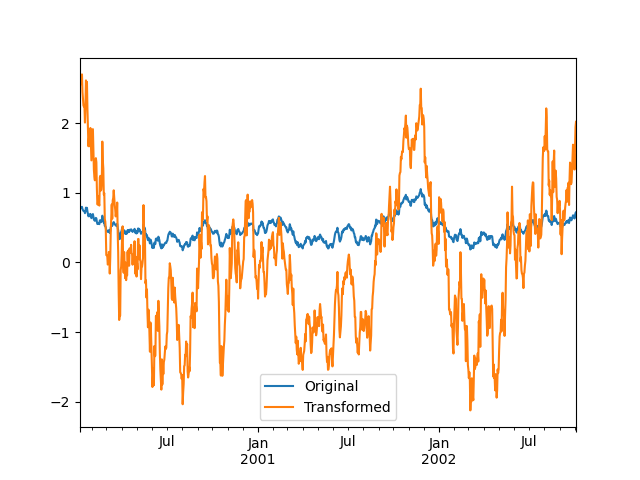
维度较低的输出的转换函数将广播以匹配输入数组的形状。
In [143]: ts.groupby(lambda x: x.year).transform(lambda x: x.max() - x.min())
Out[143]:
2000-01-08    0.623893
2000-01-09    0.623893
2000-01-10    0.623893
2000-01-11    0.623893
2000-01-12    0.623893
                ...
2002-09-30    0.558275
2002-10-01    0.558275
2002-10-02    0.558275
2002-10-03    0.558275
2002-10-04    0.558275
Freq: D, Length: 1001, dtype: float64
另一个常见的数据转换是用组均值替换缺失数据。
In [144]: cols = ["A", "B", "C"]

In [145]: values = np.random.randn(1000, 3)

In [146]: values[np.random.randint(0, 1000, 100), 0] = np.nan

In [147]: values[np.random.randint(0, 1000, 50), 1] = np.nan

In [148]: values[np.random.randint(0, 1000, 200), 2] = np.nan

In [149]: data_df = pd.DataFrame(values, columns=cols)

In [150]: data_df
Out[150]:
            A         B         C
0    1.539708 -1.166480  0.533026
1    1.302092 -0.505754       NaN
2   -0.371983  1.104803 -0.651520
3   -1.309622  1.118697 -1.161657
4   -1.924296  0.396437  0.812436
..        ...       ...       ...
995 -0.093110  0.683847 -0.774753
996 -0.185043  1.438572       NaN
997 -0.394469 -0.642343  0.011374
998 -1.174126  1.857148       NaN
999  0.234564  0.517098  0.393534

[1000 rows x 3 columns]

In [151]: countries = np.array(["US", "UK", "GR", "JP"])

In [152]: key = countries[np.random.randint(0, 4, 1000)]

In [153]: grouped = data_df.groupby(key)

# Non-NA count in each group
In [154]: grouped.count()
Out[154]:
      A    B    C
GR  209  217  189
JP  240  255  217
UK  216  231  193
US  239  250  217

In [155]: transformed = grouped.transform(lambda x: x.fillna(x.mean()))
我们可以验证转换后的数据中组均值没有改变,并且转换后的数据不包含 NA 值。
In [156]: grouped_trans = transformed.groupby(key)

In [157]: grouped.mean()  # original group means
Out[157]:
           A         B         C
GR -0.098371 -0.015420  0.068053
JP  0.069025  0.023100 -0.077324
UK  0.034069 -0.052580 -0.116525
US  0.058664 -0.020399  0.028603

In [158]: grouped_trans.mean()  # transformation did not change group means
Out[158]:
           A         B         C
GR -0.098371 -0.015420  0.068053
JP  0.069025  0.023100 -0.077324
UK  0.034069 -0.052580 -0.116525
US  0.058664 -0.020399  0.028603

In [159]: grouped.count()  # original has some missing data points
Out[159]:
      A    B    C
GR  209  217  189
JP  240  255  217
UK  216  231  193
US  239  250  217

In [160]: grouped_trans.count()  # counts after transformation
Out[160]:
      A    B    C
GR  228  228  228
JP  267  267  267
UK  247  247  247
US  258  258  258

In [161]: grouped_trans.size()  # Verify non-NA count equals group size
Out[161]:
GR    228
JP    267
UK    247
US    258
dtype: int64
如上所述,本节中的每个示例都可以使用内置方法更高效地计算。在下面的代码中,使用 UDF 的低效方法被注释掉,而更快的替代方案出现在下面。
# result = ts.groupby(lambda x: x.year).transform(
#     lambda x: (x - x.mean()) / x.std()
# )
In [162]: grouped = ts.groupby(lambda x: x.year)

In [163]: result = (ts - grouped.transform("mean")) / grouped.transform("std")

# result = ts.groupby(lambda x: x.year).transform(lambda x: x.max() - x.min())
In [164]: grouped = ts.groupby(lambda x: x.year)

In [165]: result = grouped.transform("max") - grouped.transform("min")

# grouped = data_df.groupby(key)
# result = grouped.transform(lambda x: x.fillna(x.mean()))
In [166]: grouped = data_df.groupby(key)

In [167]: result = data_df.fillna(grouped.transform("mean"))
窗口和重采样操作#
可以在 groupby 对象上使用 resample()、expanding() 和 rolling() 作为方法。
下面的示例将基于列 B 的样本,对列 A 的组应用 rolling() 方法。
In [168]: df_re = pd.DataFrame({"A": [1] * 10 + [5] * 10, "B": np.arange(20)})

In [169]: df_re
Out[169]:
    A   B
0   1   0
1   1   1
2   1   2
3   1   3
4   1   4
.. ..  ..
15  5  15
16  5  16
17  5  17
18  5  18
19  5  19

[20 rows x 2 columns]

In [170]: df_re.groupby("A").rolling(4).B.mean()
Out[170]:
A
1  0      NaN
   1      NaN
   2      NaN
   3      1.5
   4      2.5
         ...
5  15    13.5
   16    14.5
   17    15.5
   18    16.5
   19    17.5
Name: B, Length: 20, dtype: float64
expanding() 方法将为每个特定组的所有成员累积给定操作(示例中的 sum())。
In [171]: df_re.groupby("A").expanding().sum()
Out[171]:
          B
A
1 0     0.0
  1     1.0
  2     3.0
  3     6.0
  4    10.0
...     ...
5 15   75.0
  16   91.0
  17  108.0
  18  126.0
  19  145.0

[20 rows x 1 columns]
假设您想使用 resample() 方法来获取 DataFrame 中每个组的每日频率,并希望使用 ffill() 方法填充缺失值。
In [172]: df_re = pd.DataFrame(
   .....:     {
   .....:         "date": pd.date_range(start="2016-01-01", periods=4, freq="W"),
   .....:         "group": [1, 1, 2, 2],
   .....:         "val": [5, 6, 7, 8],
   .....:     }
   .....: ).set_index("date")
   .....:

In [173]: df_re
Out[173]:
            group  val
date
2016-01-03      1    5
2016-01-10      1    6
2016-01-17      2    7
2016-01-24      2    8

In [174]: df_re.groupby("group").resample("1D", include_groups=False).ffill()
Out[174]:
                  val
group date
1     2016-01-03    5
      2016-01-04    5
      2016-01-05    5
      2016-01-06    5
      2016-01-07    5
...               ...
2     2016-01-20    7
      2016-01-21    7
      2016-01-22    7
      2016-01-23    7
      2016-01-24    8

[16 rows x 1 columns]
过滤#
过滤是一种 GroupBy 操作,它对原始分组对象进行子集化。它可以过滤掉整个组,部分组,或两者。过滤返回调用对象的过滤版本,包括分组列(如果提供)。在以下示例中,class 包含在结果中。
In [175]: speeds
Out[175]:
          class           order  max_speed
falcon     bird   Falconiformes      389.0
parrot     bird  Psittaciformes       24.0
lion     mammal       Carnivora       80.2
monkey   mammal        Primates        NaN
leopard  mammal       Carnivora       58.0

In [176]: speeds.groupby("class").nth(1)
Out[176]:
         class           order  max_speed
parrot    bird  Psittaciformes       24.0
monkey  mammal        Primates        NaN
注意
与聚合不同,过滤不会将组键添加到结果的索引中。因此,传递 as_index=False 或 sort=True 不会影响这些方法。
过滤将遵循 GroupBy 对象的列子集化。
In [177]: speeds.groupby("class")[["order", "max_speed"]].nth(1)
Out[177]:
                 order  max_speed
parrot  Psittaciformes       24.0
monkey        Primates        NaN
内置过滤#
GroupBy 上的以下方法充当过滤。所有这些方法都具有高效的、GroupBy 特定的实现。
方法 |
描述 |
|---|---|
选择每个组的顶部行 |
|
选择每个组的第 n 行 |
|
选择每个组的底部行 |
用户还可以使用转换和布尔索引在组内构建复杂的过滤。例如,假设我们给定一组产品及其销量,我们希望将数据子集化,只保留每个组内销量不超过总销量 90% 的最大产品。
In [178]: product_volumes = pd.DataFrame(
   .....:     {
   .....:         "group": list("xxxxyyy"),
   .....:         "product": list("abcdefg"),
   .....:         "volume": [10, 30, 20, 15, 40, 10, 20],
   .....:     }
   .....: )
   .....:

In [179]: product_volumes
Out[179]:
  group product  volume
0     x       a      10
1     x       b      30
2     x       c      20
3     x       d      15
4     y       e      40
5     y       f      10
6     y       g      20

# Sort by volume to select the largest products first
In [180]: product_volumes = product_volumes.sort_values("volume", ascending=False)

In [181]: grouped = product_volumes.groupby("group")["volume"]

In [182]: cumpct = grouped.cumsum() / grouped.transform("sum")

In [183]: cumpct
Out[183]:
4    0.571429
1    0.400000
2    0.666667
6    0.857143
3    0.866667
0    1.000000
5    1.000000
Name: volume, dtype: float64

In [184]: significant_products = product_volumes[cumpct <= 0.9]

In [185]: significant_products.sort_values(["group", "product"])
Out[185]:
  group product  volume
1     x       b      30
2     x       c      20
3     x       d      15
4     y       e      40
6     y       g      20
filter 方法#
注意
通过提供用户定义函数 (UDF) 来进行 filter 通常比使用 GroupBy 的内置方法性能差。考虑将复杂操作分解为利用内置方法的操作链。
filter 方法接受一个用户定义函数 (UDF),该函数在应用于整个组时返回 True 或 False。filter 方法的结果是 UDF 返回 True 的组的子集。
假设我们只想获取属于组和大于 2 的元素。
In [186]: sf = pd.Series([1, 1, 2, 3, 3, 3])

In [187]: sf.groupby(sf).filter(lambda x: x.sum() > 2)
Out[187]:
3    3
4    3
5    3
dtype: int64
另一个有用的操作是过滤掉只包含少量成员的组中的元素。
In [188]: dff = pd.DataFrame({"A": np.arange(8), "B": list("aabbbbcc")})

In [189]: dff.groupby("B").filter(lambda x: len(x) > 2)
Out[189]:
   A  B
2  2  b
3  3  b
4  4  b
5  5  b
或者,我们可以返回一个索引相似的对象,其中不通过过滤的组填充 NaN,而不是删除违规组。
In [190]: dff.groupby("B").filter(lambda x: len(x) > 2, dropna=False)
Out[190]:
     A    B
0  NaN  NaN
1  NaN  NaN
2  2.0    b
3  3.0    b
4  4.0    b
5  5.0    b
6  NaN  NaN
7  NaN  NaN
对于具有多列的 DataFrame,过滤器应明确指定一列作为过滤条件。
In [191]: dff["C"] = np.arange(8)

In [192]: dff.groupby("B").filter(lambda x: len(x["C"]) > 2)
Out[192]:
   A  B  C
2  2  b  2
3  3  b  3
4  4  b  4
5  5  b  5
灵活的 apply#
一些对分组数据的操作可能不属于聚合、转换或过滤类别。对于这些情况,您可以使用 apply 函数。
警告
apply 必须根据结果来推断它应该充当归约器、转换器还是过滤器,这取决于传递给它的具体内容。因此,分组列可能包含在输出中,也可能不包含。虽然它试图智能地猜测如何行为,但有时可能会猜错。
注意
本节中的所有示例都可以使用其他 pandas 功能更可靠、更高效地计算。
In [193]: df
Out[193]:
     A      B         C         D
0  foo    one -0.575247  1.346061
1  bar    one  0.254161  1.511763
2  foo    two -1.143704  1.627081
3  bar  three  0.215897 -0.990582
4  foo    two  1.193555 -0.441652
5  bar    two -0.077118  1.211526
6  foo    one -0.408530  0.268520
7  foo  three -0.862495  0.024580

In [194]: grouped = df.groupby("A")

# could also just call .describe()
In [195]: grouped["C"].apply(lambda x: x.describe())
Out[195]:
A
bar  count    3.000000
     mean     0.130980
     std      0.181231
     min     -0.077118
     25%      0.069390
                ...
foo  min     -1.143704
     25%     -0.862495
     50%     -0.575247
     75%     -0.408530
     max      1.193555
Name: C, Length: 16, dtype: float64
返回结果的维度也可以改变
In [196]: grouped = df.groupby('A')['C']

In [197]: def f(group):
   .....:     return pd.DataFrame({'original': group,
   .....:                          'demeaned': group - group.mean()})
   .....:

In [198]: grouped.apply(f)
Out[198]:
       original  demeaned
A
bar 1  0.254161  0.123181
    3  0.215897  0.084917
    5 -0.077118 -0.208098
foo 0 -0.575247 -0.215962
    2 -1.143704 -0.784420
    4  1.193555  1.552839
    6 -0.408530 -0.049245
    7 -0.862495 -0.503211
Series 上的 apply 可以对应用函数返回的值进行操作,该值本身是一个 Series,并且可能将结果上转换为 DataFrame
In [199]: def f(x):
   .....:     return pd.Series([x, x ** 2], index=["x", "x^2"])
   .....:

In [200]: s = pd.Series(np.random.rand(5))

In [201]: s
Out[201]:
0    0.582898
1    0.098352
2    0.001438
3    0.009420
4    0.815826
dtype: float64

In [202]: s.apply(f)
Out[202]:
          x       x^2
0  0.582898  0.339770
1  0.098352  0.009673
2  0.001438  0.000002
3  0.009420  0.000089
4  0.815826  0.665572
与aggregate() 方法类似,结果的 dtype 将反映应用函数的 dtype。如果不同组的结果具有不同的 dtype,则将以与 DataFrame 构造相同的方式确定通用 dtype。
使用 group_keys 控制分组列的位置#
要控制分组列是否包含在索引中,可以使用参数 group_keys,它默认为 True。比较
In [203]: df.groupby("A", group_keys=True).apply(lambda x: x, include_groups=False)
Out[203]:
           B         C         D
A
bar 1    one  0.254161  1.511763
    3  three  0.215897 -0.990582
    5    two -0.077118  1.211526
foo 0    one -0.575247  1.346061
    2    two -1.143704  1.627081
    4    two  1.193555 -0.441652
    6    one -0.408530  0.268520
    7  three -0.862495  0.024580
与
In [204]: df.groupby("A", group_keys=False).apply(lambda x: x, include_groups=False)
Out[204]:
       B         C         D
0    one -0.575247  1.346061
1    one  0.254161  1.511763
2    two -1.143704  1.627081
3  three  0.215897 -0.990582
4    two  1.193555 -0.441652
5    two -0.077118  1.211526
6    one -0.408530  0.268520
7  three -0.862495  0.024580
Numba 加速例程#
在 1.1 版中添加。
如果 Numba 作为可选依赖项安装,则 transform 和 aggregate 方法支持 engine='numba' 和 engine_kwargs 参数。有关参数的通用用法和性能注意事项,请参阅使用 Numba 提升性能。
函数签名必须以 values, index 完全一致地开头,因为属于每个组的数据将传递到 values,而组索引将传递到 index。
警告
当使用 engine='numba' 时,内部将没有“回退”行为。组数据和组索引将作为 NumPy 数组传递给 JITed 用户定义函数,并且不会尝试其他执行。
其他有用功能#
排除非数值列#
再次考虑我们一直在研究的示例 DataFrame
In [205]: df
Out[205]:
     A      B         C         D
0  foo    one -0.575247  1.346061
1  bar    one  0.254161  1.511763
2  foo    two -1.143704  1.627081
3  bar  three  0.215897 -0.990582
4  foo    two  1.193555 -0.441652
5  bar    two -0.077118  1.211526
6  foo    one -0.408530  0.268520
7  foo  three -0.862495  0.024580
假设我们希望计算按 A 列分组的标准差。有一个小问题,即我们不关心列 B 中的数据,因为它不是数值。您可以通过指定 numeric_only=True 来避免非数值列
In [206]: df.groupby("A").std(numeric_only=True)
Out[206]:
            C         D
A
bar  0.181231  1.366330
foo  0.912265  0.884785
请注意,df.groupby('A').colname.std() 比 df.groupby('A').std().colname 更高效。因此,如果只需要聚合函数的结果对一列(这里是 colname)有效,则可以在应用聚合函数之前对其进行过滤。
In [207]: from decimal import Decimal

In [208]: df_dec = pd.DataFrame(
   .....:     {
   .....:         "id": [1, 2, 1, 2],
   .....:         "int_column": [1, 2, 3, 4],
   .....:         "dec_column": [
   .....:             Decimal("0.50"),
   .....:             Decimal("0.15"),
   .....:             Decimal("0.25"),
   .....:             Decimal("0.40"),
   .....:         ],
   .....:     }
   .....: )
   .....:

In [209]: df_dec.groupby(["id"])[["dec_column"]].sum()
Out[209]:
   dec_column
id
1        0.75
2        0.55
处理(未)观察到的分类值#
当使用 Categorical 分组器(作为单个分组器或作为多个分组器的一部分)时,observed 关键字控制是返回所有可能分组器值的笛卡尔积(observed=False)还是只返回那些已观察到的分组器(observed=True)。
显示所有值
In [210]: pd.Series([1, 1, 1]).groupby(
   .....:     pd.Categorical(["a", "a", "a"], categories=["a", "b"]), observed=False
   .....: ).count()
   .....:
Out[210]:
a    3
b    0
dtype: int64
仅显示观察到的值
In [211]: pd.Series([1, 1, 1]).groupby(
   .....:     pd.Categorical(["a", "a", "a"], categories=["a", "b"]), observed=True
   .....: ).count()
   .....:
Out[211]:
a    3
dtype: int64
分组的返回 dtype 总是包含所有被分组的类别。
In [212]: s = (
   .....:     pd.Series([1, 1, 1])
   .....:     .groupby(pd.Categorical(["a", "a", "a"], categories=["a", "b"]), observed=True)
   .....:     .count()
   .....: )
   .....:

In [213]: s.index.dtype
Out[213]: CategoricalDtype(categories=['a', 'b'], ordered=False, categories_dtype=object)
NA 组处理#
这里所说的 NA,是指任何 NA 值,包括 NA、NaN、NaT 和 None。如果分组键中存在任何 NA 值,默认情况下它们将被排除。换句话说,任何“NA 组”都将被删除。您可以通过指定 dropna=False 来包含 NA 组。
In [214]: df = pd.DataFrame({"key": [1.0, 1.0, np.nan, 2.0, np.nan], "A": [1, 2, 3, 4, 5]})

In [215]: df
Out[215]:
   key  A
0  1.0  1
1  1.0  2
2  NaN  3
3  2.0  4
4  NaN  5

In [216]: df.groupby("key", dropna=True).sum()
Out[216]:
     A
key
1.0  3
2.0  4

In [217]: df.groupby("key", dropna=False).sum()
Out[217]:
     A
key
1.0  3
2.0  4
NaN  8
有序因子分组#
表示为 pandas 的 Categorical 类实例的分类变量可以用作组键。如果使用,则会保留级别的顺序。当 observed=False 和 sort=False 时,任何未观察到的类别将按顺序位于结果的末尾。
In [218]: days = pd.Categorical(
   .....:     values=["Wed", "Mon", "Thu", "Mon", "Wed", "Sat"],
   .....:     categories=["Mon", "Tue", "Wed", "Thu", "Fri", "Sat", "Sun"],
   .....: )
   .....:

In [219]: data = pd.DataFrame(
   .....:    {
   .....:        "day": days,
   .....:        "workers": [3, 4, 1, 4, 2, 2],
   .....:    }
   .....: )
   .....:

In [220]: data
Out[220]:
   day  workers
0  Wed        3
1  Mon        4
2  Thu        1
3  Mon        4
4  Wed        2
5  Sat        2

In [221]: data.groupby("day", observed=False, sort=True).sum()
Out[221]:
     workers
day
Mon        8
Tue        0
Wed        5
Thu        1
Fri        0
Sat        2
Sun        0

In [222]: data.groupby("day", observed=False, sort=False).sum()
Out[222]:
     workers
day
Wed        5
Mon        8
Thu        1
Sat        2
Tue        0
Fri        0
Sun        0
使用分组器规范进行分组#
您可能需要指定更多数据才能正确分组。您可以使用 pd.Grouper 来提供这种本地控制。
In [223]: import datetime

In [224]: df = pd.DataFrame(
   .....:     {
   .....:         "Branch": "A A A A A A A B".split(),
   .....:         "Buyer": "Carl Mark Carl Carl Joe Joe Joe Carl".split(),
   .....:         "Quantity": [1, 3, 5, 1, 8, 1, 9, 3],
   .....:         "Date": [
   .....:             datetime.datetime(2013, 1, 1, 13, 0),
   .....:             datetime.datetime(2013, 1, 1, 13, 5),
   .....:             datetime.datetime(2013, 10, 1, 20, 0),
   .....:             datetime.datetime(2013, 10, 2, 10, 0),
   .....:             datetime.datetime(2013, 10, 1, 20, 0),
   .....:             datetime.datetime(2013, 10, 2, 10, 0),
   .....:             datetime.datetime(2013, 12, 2, 12, 0),
   .....:             datetime.datetime(2013, 12, 2, 14, 0),
   .....:         ],
   .....:     }
   .....: )
   .....:

In [225]: df
Out[225]:
  Branch Buyer  Quantity                Date
0      A  Carl         1 2013-01-01 13:00:00
1      A  Mark         3 2013-01-01 13:05:00
2      A  Carl         5 2013-10-01 20:00:00
3      A  Carl         1 2013-10-02 10:00:00
4      A   Joe         8 2013-10-01 20:00:00
5      A   Joe         1 2013-10-02 10:00:00
6      A   Joe         9 2013-12-02 12:00:00
7      B  Carl         3 2013-12-02 14:00:00
按具有所需频率的特定列进行分组。这类似于重采样。
In [226]: df.groupby([pd.Grouper(freq="1ME", key="Date"), "Buyer"])[["Quantity"]].sum()
Out[226]:
                  Quantity
Date       Buyer
2013-01-31 Carl          1
           Mark          3
2013-10-31 Carl          6
           Joe           9
2013-12-31 Carl          3
           Joe           9
当指定 freq 时,pd.Grouper 返回的对象将是 pandas.api.typing.TimeGrouper 的实例。当列和索引具有相同名称时,您可以使用 key 按列分组,使用 level 按索引分组。
In [227]: df = df.set_index("Date")

In [228]: df["Date"] = df.index + pd.offsets.MonthEnd(2)

In [229]: df.groupby([pd.Grouper(freq="6ME", key="Date"), "Buyer"])[["Quantity"]].sum()
Out[229]:
                  Quantity
Date       Buyer
2013-02-28 Carl          1
           Mark          3
2014-02-28 Carl          9
           Joe          18

In [230]: df.groupby([pd.Grouper(freq="6ME", level="Date"), "Buyer"])[["Quantity"]].sum()
Out[230]:
                  Quantity
Date       Buyer
2013-01-31 Carl          1
           Mark          3
2014-01-31 Carl          9
           Joe          18
获取每个组的第一行#
就像 DataFrame 或 Series 一样,您可以在 groupby 对象上调用 head 和 tail
In [231]: df = pd.DataFrame([[1, 2], [1, 4], [5, 6]], columns=["A", "B"])

In [232]: df
Out[232]:
   A  B
0  1  2
1  1  4
2  5  6

In [233]: g = df.groupby("A")

In [234]: g.head(1)
Out[234]:
   A  B
0  1  2
2  5  6

In [235]: g.tail(1)
Out[235]:
   A  B
1  1  4
2  5  6
这显示了每个组的前 n 行或最后 n 行。
获取每个组的第 n 行#
要从每个组中选择第 n 个项目,请使用 DataFrameGroupBy.nth() 或 SeriesGroupBy.nth()。提供的参数可以是任何整数、整数列表、切片或切片列表;有关示例,请参见下文。当组的第 n 个元素不存在时,不会引发错误;而是不返回相应的行。
通常,此操作充当过滤。在某些情况下,它还会为每个组返回一行,使其也成为一个归约。然而,由于它通常可以为每个组返回零行或多行,pandas 在所有情况下都将其视为过滤。
In [236]: df = pd.DataFrame([[1, np.nan], [1, 4], [5, 6]], columns=["A", "B"])

In [237]: g = df.groupby("A")

In [238]: g.nth(0)
Out[238]:
   A    B
0  1  NaN
2  5  6.0

In [239]: g.nth(-1)
Out[239]:
   A    B
1  1  4.0
2  5  6.0

In [240]: g.nth(1)
Out[240]:
   A    B
1  1  4.0
如果组的第 n 个元素不存在,则结果中不包含相应的行。特别是,如果指定的 n 大于任何组,则结果将是一个空的 DataFrame。
In [241]: g.nth(5)
Out[241]:
Empty DataFrame
Columns: [A, B]
Index: []
如果要选择第 n 个非空项,请使用 dropna kwarg。对于 DataFrame,它应该像您传递给 dropna 一样是 'any' 或 'all'
# nth(0) is the same as g.first()
In [242]: g.nth(0, dropna="any")
Out[242]:
   A    B
1  1  4.0
2  5  6.0

In [243]: g.first()
Out[243]:
     B
A
1  4.0
5  6.0

# nth(-1) is the same as g.last()
In [244]: g.nth(-1, dropna="any")
Out[244]:
   A    B
1  1  4.0
2  5  6.0

In [245]: g.last()
Out[245]:
     B
A
1  4.0
5  6.0

In [246]: g.B.nth(0, dropna="all")
Out[246]:
1    4.0
2    6.0
Name: B, dtype: float64
您还可以通过将多个 nth 值指定为整数列表来从每个组中选择多行。
In [247]: business_dates = pd.date_range(start="4/1/2014", end="6/30/2014", freq="B")

In [248]: df = pd.DataFrame(1, index=business_dates, columns=["a", "b"])

# get the first, 4th, and last date index for each month
In [249]: df.groupby([df.index.year, df.index.month]).nth([0, 3, -1])
Out[249]:
            a  b
2014-04-01  1  1
2014-04-04  1  1
2014-04-30  1  1
2014-05-01  1  1
2014-05-06  1  1
2014-05-30  1  1
2014-06-02  1  1
2014-06-05  1  1
2014-06-30  1  1
您也可以使用切片或切片列表。
In [250]: df.groupby([df.index.year, df.index.month]).nth[1:]
Out[250]:
            a  b
2014-04-02  1  1
2014-04-03  1  1
2014-04-04  1  1
2014-04-07  1  1
2014-04-08  1  1
...        .. ..
2014-06-24  1  1
2014-06-25  1  1
2014-06-26  1  1
2014-06-27  1  1
2014-06-30  1  1

[62 rows x 2 columns]

In [251]: df.groupby([df.index.year, df.index.month]).nth[1:, :-1]
Out[251]:
            a  b
2014-04-01  1  1
2014-04-02  1  1
2014-04-03  1  1
2014-04-04  1  1
2014-04-07  1  1
...        .. ..
2014-06-24  1  1
2014-06-25  1  1
2014-06-26  1  1
2014-06-27  1  1
2014-06-30  1  1

[65 rows x 2 columns]
枚举组项#
要查看每行在其组中出现的顺序,请使用 cumcount 方法
In [252]: dfg = pd.DataFrame(list("aaabba"), columns=["A"])

In [253]: dfg
Out[253]:
   A
0  a
1  a
2  a
3  b
4  b
5  a

In [254]: dfg.groupby("A").cumcount()
Out[254]:
0    0
1    1
2    2
3    0
4    1
5    3
dtype: int64

In [255]: dfg.groupby("A").cumcount(ascending=False)
Out[255]:
0    3
1    2
2    1
3    1
4    0
5    0
dtype: int64
枚举组#
要查看组的顺序(与 cumcount 给出的组内行的顺序相反),您可以使用 DataFrameGroupBy.ngroup()。
请注意,分配给组的数字与迭代分组对象时组出现的顺序一致,而不是它们首次观察到的顺序。
In [256]: dfg = pd.DataFrame(list("aaabba"), columns=["A"])

In [257]: dfg
Out[257]:
   A
0  a
1  a
2  a
3  b
4  b
5  a

In [258]: dfg.groupby("A").ngroup()
Out[258]:
0    0
1    0
2    0
3    1
4    1
5    0
dtype: int64

In [259]: dfg.groupby("A").ngroup(ascending=False)
Out[259]:
0    1
1    1
2    1
3    0
4    0
5    1
dtype: int64
绘图#
GroupBy 也适用于一些绘图方法。在这种情况下,假设我们怀疑第 1 列中的值在“B”组中平均高出 3 倍。
In [260]: np.random.seed(1234)

In [261]: df = pd.DataFrame(np.random.randn(50, 2))

In [262]: df["g"] = np.random.choice(["A", "B"], size=50)

In [263]: df.loc[df["g"] == "B", 1] += 3
我们可以通过箱线图轻松地可视化这一点
In [264]: df.groupby("g").boxplot()
Out[264]:
A         Axes(0.1,0.15;0.363636x0.75)
B    Axes(0.536364,0.15;0.363636x0.75)
dtype: object
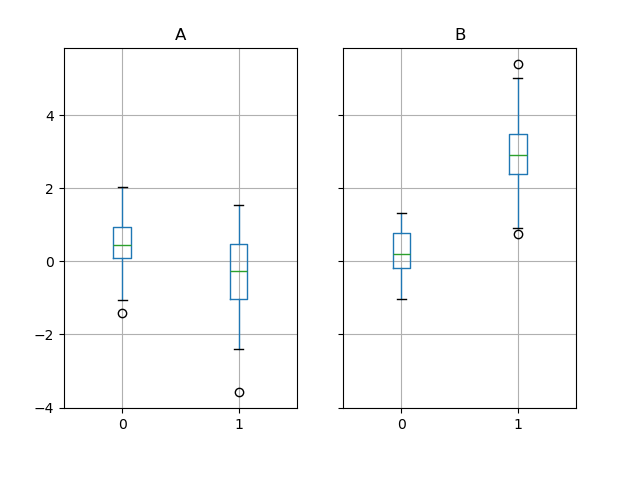
调用 boxplot 的结果是一个字典,其键是我们的分组列 g 的值(“A”和“B”)。结果字典的值可以通过 boxplot 的 return_type 关键字控制。有关更多信息,请参阅可视化文档。
警告
由于历史原因,df.groupby("g").boxplot() 不等同于 df.boxplot(by="g")。有关解释,请参阅此处。
管道函数调用#
类似于 DataFrame 和 Series 提供的功能,接受 GroupBy 对象的函数可以使用 pipe 方法链式调用,以实现更清晰、更易读的语法。要了解 .pipe 的一般用法,请参阅此处。
结合 .groupby 和 .pipe 通常在需要重用 GroupBy 对象时非常有用。
举个例子,假设有一个 DataFrame 包含商店、产品、收入和销量列。我们希望按商店和产品对价格(即收入/销量)进行分组计算。我们可以通过多步操作完成此操作,但用管道表示可以使代码更具可读性。首先我们设置数据
In [265]: n = 1000

In [266]: df = pd.DataFrame(
   .....:     {
   .....:         "Store": np.random.choice(["Store_1", "Store_2"], n),
   .....:         "Product": np.random.choice(["Product_1", "Product_2"], n),
   .....:         "Revenue": (np.random.random(n) * 50 + 10).round(2),
   .....:         "Quantity": np.random.randint(1, 10, size=n),
   .....:     }
   .....: )
   .....:

In [267]: df.head(2)
Out[267]:
     Store    Product  Revenue  Quantity
0  Store_2  Product_1    26.12         1
1  Store_2  Product_1    28.86         1
我们现在找出每家商店/产品的价格。
In [268]: (
   .....:     df.groupby(["Store", "Product"])
   .....:     .pipe(lambda grp: grp.Revenue.sum() / grp.Quantity.sum())
   .....:     .unstack()
   .....:     .round(2)
   .....: )
   .....:
Out[268]:
Product  Product_1  Product_2
Store
Store_1       6.82       7.05
Store_2       6.30       6.64
当您想将分组对象传递给某个任意函数时,管道也可以表达得很清楚,例如
In [269]: def mean(groupby):
   .....:     return groupby.mean()
   .....:

In [270]: df.groupby(["Store", "Product"]).pipe(mean)
Out[270]:
                     Revenue  Quantity
Store   Product
Store_1 Product_1  34.622727  5.075758
        Product_2  35.482815  5.029630
Store_2 Product_1  32.972837  5.237589
        Product_2  34.684360  5.224000
这里 mean 接收一个 GroupBy 对象,并分别计算每个商店-产品组合的收入和数量的均值。mean 函数可以是任何接受 GroupBy 对象的函数;.pipe 会将 GroupBy 对象作为参数传递给您指定的函数。
示例#
多列因子化#
通过使用 DataFrameGroupBy.ngroup(),我们可以以类似于 factorize()(如重塑 API 中进一步描述的)的方式提取有关组的信息,但它自然适用于多列混合类型和不同来源的数据。这在处理过程中作为中间的类似分类的步骤可能很有用,当组行之间的关系比其内容更重要时,或者作为只接受整数编码的算法的输入。(有关 pandas 对完整分类数据的支持的更多信息,请参阅分类介绍和API 文档。)
In [271]: dfg = pd.DataFrame({"A": [1, 1, 2, 3, 2], "B": list("aaaba")})

In [272]: dfg
Out[272]:
   A  B
0  1  a
1  1  a
2  2  a
3  3  b
4  2  a

In [273]: dfg.groupby(["A", "B"]).ngroup()
Out[273]:
0    0
1    0
2    1
3    2
4    1
dtype: int64

In [274]: dfg.groupby(["A", [0, 0, 0, 1, 1]]).ngroup()
Out[274]:
0    0
1    0
2    1
3    3
4    2
dtype: int64
通过索引器分组以“重采样”数据#
重采样从已有的观测数据或生成数据的模型中生成新的假设样本(重采样)。这些新样本与预先存在的样本相似。
为了使重采样适用于非日期时间类的索引,可以使用以下过程。
在以下示例中,df.index // 5 返回一个整数数组,用于确定 groupby 操作选择的内容。
注意
下面的示例展示了如何通过样本合并来下采样。这里,通过使用 df.index // 5,我们将样本聚合到不同的箱中。通过应用 std() 函数,我们将许多样本中包含的信息聚合为一小部分值,即它们的标准差,从而减少样本数量。
In [275]: df = pd.DataFrame(np.random.randn(10, 2))

In [276]: df
Out[276]:
          0         1
0 -0.793893  0.321153
1  0.342250  1.618906
2 -0.975807  1.918201
3 -0.810847 -1.405919
4 -1.977759  0.461659
5  0.730057 -1.316938
6 -0.751328  0.528290
7 -0.257759 -1.081009
8  0.505895 -1.701948
9 -1.006349  0.020208

In [277]: df.index // 5
Out[277]: Index([0, 0, 0, 0, 0, 1, 1, 1, 1, 1], dtype='int64')

In [278]: df.groupby(df.index // 5).std()
Out[278]:
          0         1
0  0.823647  1.312912
1  0.760109  0.942941
返回 Series 以传播名称#
分组 DataFrame 列,计算一组指标并返回一个命名 Series。Series 名称用作列索引的名称。这与重塑操作(如堆叠)结合使用时特别有用,其中列索引名称将用作插入列的名称
In [279]: df = pd.DataFrame(
   .....:     {
   .....:         "a": [0, 0, 0, 0, 1, 1, 1, 1, 2, 2, 2, 2],
   .....:         "b": [0, 0, 1, 1, 0, 0, 1, 1, 0, 0, 1, 1],
   .....:         "c": [1, 0, 1, 0, 1, 0, 1, 0, 1, 0, 1, 0],
   .....:         "d": [0, 0, 0, 1, 0, 0, 0, 1, 0, 0, 0, 1],
   .....:     }
   .....: )
   .....:

In [280]: def compute_metrics(x):
   .....:     result = {"b_sum": x["b"].sum(), "c_mean": x["c"].mean()}
   .....:     return pd.Series(result, name="metrics")
   .....:

In [281]: result = df.groupby("a").apply(compute_metrics, include_groups=False)

In [282]: result
Out[282]:
metrics  b_sum  c_mean
a
0          2.0     0.5
1          2.0     0.5
2          2.0     0.5

In [283]: result.stack(future_stack=True)
Out[283]:
a  metrics
0  b_sum      2.0
   c_mean     0.5
1  b_sum      2.0
   c_mean     0.5
2  b_sum      2.0
   c_mean     0.5
dtype: float64