菜谱#
这是一个收录 简短而实用 的示例和有用 pandas 技巧链接的存储库。我们鼓励用户为本文档添砖加瓦。
向本节添加有趣的链接和/或内联示例是一个很棒的 首次拉取请求。
在可能的情况下,已插入简化、精炼、对新用户友好的内联示例,以补充 Stack-Overflow 和 GitHub 链接。许多链接包含比内联示例更丰富的信息。
pandas (pd) 和 NumPy (np) 是仅有的两个缩写导入模块。其余的都明确导入,以方便新用户。
惯用法#
这些是一些精巧的 pandas 惯用法
对一列进行 if-then/if-then-else 操作,并赋值给一个或多个其他列
In [1]: df = pd.DataFrame(
   ...:     {"AAA": [4, 5, 6, 7], "BBB": [10, 20, 30, 40], "CCC": [100, 50, -30, -50]}
   ...: )
   ...:

In [2]: df
Out[2]:
   AAA  BBB  CCC
0    4   10  100
1    5   20   50
2    6   30  -30
3    7   40  -50
if-then…#
对一列进行 if-then 操作
In [3]: df.loc[df.AAA >= 5, "BBB"] = -1

In [4]: df
Out[4]:
   AAA  BBB  CCC
0    4   10  100
1    5   -1   50
2    6   -1  -30
3    7   -1  -50
带赋值到 2 列的 if-then 操作
In [5]: df.loc[df.AAA >= 5, ["BBB", "CCC"]] = 555

In [6]: df
Out[6]:
   AAA  BBB  CCC
0    4   10  100
1    5  555  555
2    6  555  555
3    7  555  555
添加另一行具有不同逻辑的代码,以实现 -else
In [7]: df.loc[df.AAA < 5, ["BBB", "CCC"]] = 2000

In [8]: df
Out[8]:
   AAA   BBB   CCC
0    4  2000  2000
1    5   555   555
2    6   555   555
3    7   555   555
或者在设置掩码后使用 pandas 的 `where` 方法
In [9]: df_mask = pd.DataFrame(
   ...:     {"AAA": [True] * 4, "BBB": [False] * 4, "CCC": [True, False] * 2}
   ...: )
   ...:

In [10]: df.where(df_mask, -1000)
Out[10]:
   AAA   BBB   CCC
0    4 -1000  2000
1    5 -1000 -1000
2    6 -1000   555
3    7 -1000 -1000
使用 NumPy 的 `where()` 进行 if-then-else
In [11]: df = pd.DataFrame(
   ....:     {"AAA": [4, 5, 6, 7], "BBB": [10, 20, 30, 40], "CCC": [100, 50, -30, -50]}
   ....: )
   ....:

In [12]: df
Out[12]:
   AAA  BBB  CCC
0    4   10  100
1    5   20   50
2    6   30  -30
3    7   40  -50

In [13]: df["logic"] = np.where(df["AAA"] > 5, "high", "low")

In [14]: df
Out[14]:
   AAA  BBB  CCC logic
0    4   10  100   low
1    5   20   50   low
2    6   30  -30  high
3    7   40  -50  high
拆分#
In [15]: df = pd.DataFrame(
   ....:     {"AAA": [4, 5, 6, 7], "BBB": [10, 20, 30, 40], "CCC": [100, 50, -30, -50]}
   ....: )
   ....:

In [16]: df
Out[16]:
   AAA  BBB  CCC
0    4   10  100
1    5   20   50
2    6   30  -30
3    7   40  -50

In [17]: df[df.AAA <= 5]
Out[17]:
   AAA  BBB  CCC
0    4   10  100
1    5   20   50

In [18]: df[df.AAA > 5]
Out[18]:
   AAA  BBB  CCC
2    6   30  -30
3    7   40  -50
构建条件#
In [19]: df = pd.DataFrame(
   ....:     {"AAA": [4, 5, 6, 7], "BBB": [10, 20, 30, 40], "CCC": [100, 50, -30, -50]}
   ....: )
   ....:

In [20]: df
Out[20]:
   AAA  BBB  CCC
0    4   10  100
1    5   20   50
2    6   30  -30
3    7   40  -50
…和 (不赋值时返回一个 Series)
In [21]: df.loc[(df["BBB"] < 25) & (df["CCC"] >= -40), "AAA"]
Out[21]:
0    4
1    5
Name: AAA, dtype: int64
…或 (不赋值时返回一个 Series)
In [22]: df.loc[(df["BBB"] > 25) | (df["CCC"] >= -40), "AAA"]
Out[22]:
0    4
1    5
2    6
3    7
Name: AAA, dtype: int64
…或 (赋值时修改 DataFrame。)
In [23]: df.loc[(df["BBB"] > 25) | (df["CCC"] >= 75), "AAA"] = 999

In [24]: df
Out[24]:
   AAA  BBB  CCC
0  999   10  100
1    5   20   50
2  999   30  -30
3  999   40  -50
In [25]: df = pd.DataFrame(
   ....:     {"AAA": [4, 5, 6, 7], "BBB": [10, 20, 30, 40], "CCC": [100, 50, -30, -50]}
   ....: )
   ....:

In [26]: df
Out[26]:
   AAA  BBB  CCC
0    4   10  100
1    5   20   50
2    6   30  -30
3    7   40  -50

In [27]: aValue = 43.0

In [28]: df.loc[(df.CCC - aValue).abs().argsort()]
Out[28]:
   AAA  BBB  CCC
1    5   20   50
0    4   10  100
2    6   30  -30
3    7   40  -50
In [29]: df = pd.DataFrame(
   ....:     {"AAA": [4, 5, 6, 7], "BBB": [10, 20, 30, 40], "CCC": [100, 50, -30, -50]}
   ....: )
   ....:

In [30]: df
Out[30]:
   AAA  BBB  CCC
0    4   10  100
1    5   20   50
2    6   30  -30
3    7   40  -50

In [31]: Crit1 = df.AAA <= 5.5

In [32]: Crit2 = df.BBB == 10.0

In [33]: Crit3 = df.CCC > -40.0
可以硬编码
In [34]: AllCrit = Crit1 & Crit2 & Crit3
…或者可以通过动态构建的条件列表来完成
In [35]: import functools

In [36]: CritList = [Crit1, Crit2, Crit3]

In [37]: AllCrit = functools.reduce(lambda x, y: x & y, CritList)

In [38]: df[AllCrit]
Out[38]:
   AAA  BBB  CCC
0    4   10  100
选择#
数据框#
参见索引文档。
In [39]: df = pd.DataFrame(
   ....:     {"AAA": [4, 5, 6, 7], "BBB": [10, 20, 30, 40], "CCC": [100, 50, -30, -50]}
   ....: )
   ....:

In [40]: df
Out[40]:
   AAA  BBB  CCC
0    4   10  100
1    5   20   50
2    6   30  -30
3    7   40  -50

In [41]: df[(df.AAA <= 6) & (df.index.isin([0, 2, 4]))]
Out[41]:
   AAA  BBB  CCC
0    4   10  100
2    6   30  -30
使用 `loc` 进行标签定位切片,使用 `iloc` 进行位置定位切片 GH 2904
In [42]: df = pd.DataFrame(
   ....:     {"AAA": [4, 5, 6, 7], "BBB": [10, 20, 30, 40], "CCC": [100, 50, -30, -50]},
   ....:     index=["foo", "bar", "boo", "kar"],
   ....: )
   ....:
有两种显式切片方法,以及第三种通用情况
基于位置的(Python 切片风格:不包含结束位置)
基于标签的(非 Python 切片风格:包含结束位置)
通用(任一切片风格:取决于切片包含标签还是位置)
In [43]: df.loc["bar":"kar"]  # Label
Out[43]:
     AAA  BBB  CCC
bar    5   20   50
boo    6   30  -30
kar    7   40  -50

# Generic
In [44]: df[0:3]
Out[44]:
     AAA  BBB  CCC
foo    4   10  100
bar    5   20   50
boo    6   30  -30

In [45]: df["bar":"kar"]
Out[45]:
     AAA  BBB  CCC
bar    5   20   50
boo    6   30  -30
kar    7   40  -50
当索引由非零起始或非单位增量的整数组成时,会产生歧义。
In [46]: data = {"AAA": [4, 5, 6, 7], "BBB": [10, 20, 30, 40], "CCC": [100, 50, -30, -50]}

In [47]: df2 = pd.DataFrame(data=data, index=[1, 2, 3, 4])  # Note index starts at 1.

In [48]: df2.iloc[1:3]  # Position-oriented
Out[48]:
   AAA  BBB  CCC
2    5   20   50
3    6   30  -30

In [49]: df2.loc[1:3]  # Label-oriented
Out[49]:
   AAA  BBB  CCC
1    4   10  100
2    5   20   50
3    6   30  -30
In [50]: df = pd.DataFrame(
   ....:     {"AAA": [4, 5, 6, 7], "BBB": [10, 20, 30, 40], "CCC": [100, 50, -30, -50]}
   ....: )
   ....:

In [51]: df
Out[51]:
   AAA  BBB  CCC
0    4   10  100
1    5   20   50
2    6   30  -30
3    7   40  -50

In [52]: df[~((df.AAA <= 6) & (df.index.isin([0, 2, 4])))]
Out[52]:
   AAA  BBB  CCC
1    5   20   50
3    7   40  -50
新列#
使用 `DataFrame.map` (原名 `applymap`) 高效动态创建新列
In [53]: df = pd.DataFrame({"AAA": [1, 2, 1, 3], "BBB": [1, 1, 2, 2], "CCC": [2, 1, 3, 1]})

In [54]: df
Out[54]:
   AAA  BBB  CCC
0    1    1    2
1    2    1    1
2    1    2    3
3    3    2    1

In [55]: source_cols = df.columns  # Or some subset would work too

In [56]: new_cols = [str(x) + "_cat" for x in source_cols]

In [57]: categories = {1: "Alpha", 2: "Beta", 3: "Charlie"}

In [58]: df[new_cols] = df[source_cols].map(categories.get)

In [59]: df
Out[59]:
   AAA  BBB  CCC  AAA_cat BBB_cat  CCC_cat
0    1    1    2    Alpha   Alpha     Beta
1    2    1    1     Beta   Alpha    Alpha
2    1    2    3    Alpha    Beta  Charlie
3    3    2    1  Charlie    Beta    Alpha
在使用 `groupby` 和 `min()` 时保留其他列
In [60]: df = pd.DataFrame(
   ....:     {"AAA": [1, 1, 1, 2, 2, 2, 3, 3], "BBB": [2, 1, 3, 4, 5, 1, 2, 3]}
   ....: )
   ....:

In [61]: df
Out[61]:
   AAA  BBB
0    1    2
1    1    1
2    1    3
3    2    4
4    2    5
5    2    1
6    3    2
7    3    3
方法 1 : `idxmin()` 获取最小值的索引
In [62]: df.loc[df.groupby("AAA")["BBB"].idxmin()]
Out[62]:
   AAA  BBB
1    1    1
5    2    1
6    3    2
方法 2 : 先排序,然后取每个组的第一个
In [63]: df.sort_values(by="BBB").groupby("AAA", as_index=False).first()
Out[63]:
   AAA  BBB
0    1    1
1    2    1
2    3    2
请注意,结果相同,除了索引。
多重索引#
参见多重索引文档。
In [64]: df = pd.DataFrame(
   ....:     {
   ....:         "row": [0, 1, 2],
   ....:         "One_X": [1.1, 1.1, 1.1],
   ....:         "One_Y": [1.2, 1.2, 1.2],
   ....:         "Two_X": [1.11, 1.11, 1.11],
   ....:         "Two_Y": [1.22, 1.22, 1.22],
   ....:     }
   ....: )
   ....:

In [65]: df
Out[65]:
   row  One_X  One_Y  Two_X  Two_Y
0    0    1.1    1.2   1.11   1.22
1    1    1.1    1.2   1.11   1.22
2    2    1.1    1.2   1.11   1.22

# As Labelled Index
In [66]: df = df.set_index("row")

In [67]: df
Out[67]:
     One_X  One_Y  Two_X  Two_Y
row
0      1.1    1.2   1.11   1.22
1      1.1    1.2   1.11   1.22
2      1.1    1.2   1.11   1.22

# With Hierarchical Columns
In [68]: df.columns = pd.MultiIndex.from_tuples([tuple(c.split("_")) for c in df.columns])

In [69]: df
Out[69]:
     One        Two
       X    Y     X     Y
row
0    1.1  1.2  1.11  1.22
1    1.1  1.2  1.11  1.22
2    1.1  1.2  1.11  1.22

# Now stack & Reset
In [70]: df = df.stack(0, future_stack=True).reset_index(1)

In [71]: df
Out[71]:
    level_1     X     Y
row
0       One  1.10  1.20
0       Two  1.11  1.22
1       One  1.10  1.20
1       Two  1.11  1.22
2       One  1.10  1.20
2       Two  1.11  1.22

# And fix the labels (Notice the label 'level_1' got added automatically)
In [72]: df.columns = ["Sample", "All_X", "All_Y"]

In [73]: df
Out[73]:
    Sample  All_X  All_Y
row
0      One   1.10   1.20
0      Two   1.11   1.22
1      One   1.10   1.20
1      Two   1.11   1.22
2      One   1.10   1.20
2      Two   1.11   1.22
算术运算#
In [74]: cols = pd.MultiIndex.from_tuples(
   ....:     [(x, y) for x in ["A", "B", "C"] for y in ["O", "I"]]
   ....: )
   ....:

In [75]: df = pd.DataFrame(np.random.randn(2, 6), index=["n", "m"], columns=cols)

In [76]: df
Out[76]:
          A                   B                   C
          O         I         O         I         O         I
n  0.469112 -0.282863 -1.509059 -1.135632  1.212112 -0.173215
m  0.119209 -1.044236 -0.861849 -2.104569 -0.494929  1.071804

In [77]: df = df.div(df["C"], level=1)

In [78]: df
Out[78]:
          A                   B              C
          O         I         O         I    O    I
n  0.387021  1.633022 -1.244983  6.556214  1.0  1.0
m -0.240860 -0.974279  1.741358 -1.963577  1.0  1.0
切片#
In [79]: coords = [("AA", "one"), ("AA", "six"), ("BB", "one"), ("BB", "two"), ("BB", "six")]

In [80]: index = pd.MultiIndex.from_tuples(coords)

In [81]: df = pd.DataFrame([11, 22, 33, 44, 55], index, ["MyData"])

In [82]: df
Out[82]:
        MyData
AA one      11
   six      22
BB one      33
   two      44
   six      55
获取第一级和第一轴索引的横截面
# Note : level and axis are optional, and default to zero
In [83]: df.xs("BB", level=0, axis=0)
Out[83]:
     MyData
one      33
two      44
six      55
…现在是第一轴的第二级。
In [84]: df.xs("six", level=1, axis=0)
Out[84]:
    MyData
AA      22
BB      55
使用 `xs` 对 MultiIndex 进行切片,方法 #2
In [85]: import itertools

In [86]: index = list(itertools.product(["Ada", "Quinn", "Violet"], ["Comp", "Math", "Sci"]))

In [87]: headr = list(itertools.product(["Exams", "Labs"], ["I", "II"]))

In [88]: indx = pd.MultiIndex.from_tuples(index, names=["Student", "Course"])

In [89]: cols = pd.MultiIndex.from_tuples(headr)  # Notice these are un-named

In [90]: data = [[70 + x + y + (x * y) % 3 for x in range(4)] for y in range(9)]

In [91]: df = pd.DataFrame(data, indx, cols)

In [92]: df
Out[92]:
               Exams     Labs
                   I  II    I  II
Student Course
Ada     Comp      70  71   72  73
        Math      71  73   75  74
        Sci       72  75   75  75
Quinn   Comp      73  74   75  76
        Math      74  76   78  77
        Sci       75  78   78  78
Violet  Comp      76  77   78  79
        Math      77  79   81  80
        Sci       78  81   81  81

In [93]: All = slice(None)

In [94]: df.loc["Violet"]
Out[94]:
       Exams     Labs
           I  II    I  II
Course
Comp      76  77   78  79
Math      77  79   81  80
Sci       78  81   81  81

In [95]: df.loc[(All, "Math"), All]
Out[95]:
               Exams     Labs
                   I  II    I  II
Student Course
Ada     Math      71  73   75  74
Quinn   Math      74  76   78  77
Violet  Math      77  79   81  80

In [96]: df.loc[(slice("Ada", "Quinn"), "Math"), All]
Out[96]:
               Exams     Labs
                   I  II    I  II
Student Course
Ada     Math      71  73   75  74
Quinn   Math      74  76   78  77

In [97]: df.loc[(All, "Math"), ("Exams")]
Out[97]:
                 I  II
Student Course
Ada     Math    71  73
Quinn   Math    74  76
Violet  Math    77  79

In [98]: df.loc[(All, "Math"), (All, "II")]
Out[98]:
               Exams Labs
                  II   II
Student Course
Ada     Math      73   74
Quinn   Math      76   77
Violet  Math      79   80
排序#
In [99]: df.sort_values(by=("Labs", "II"), ascending=False)
Out[99]:
               Exams     Labs
                   I  II    I  II
Student Course
Violet  Sci       78  81   81  81
        Math      77  79   81  80
        Comp      76  77   78  79
Quinn   Sci       75  78   78  78
        Math      74  76   78  77
        Comp      73  74   75  76
Ada     Sci       72  75   75  75
        Math      71  73   75  74
        Comp      70  71   72  73
部分选择,需要排序 GH 2995
级别#
缺失数据#
参见缺失数据文档。
正向填充反向时间序列
In [100]: df = pd.DataFrame(
   .....:     np.random.randn(6, 1),
   .....:     index=pd.date_range("2013-08-01", periods=6, freq="B"),
   .....:     columns=list("A"),
   .....: )
   .....:

In [101]: df.loc[df.index[3], "A"] = np.nan

In [102]: df
Out[102]:
                   A
2013-08-01  0.721555
2013-08-02 -0.706771
2013-08-05 -1.039575
2013-08-06       NaN
2013-08-07 -0.424972
2013-08-08  0.567020

In [103]: df.bfill()
Out[103]:
                   A
2013-08-01  0.721555
2013-08-02 -0.706771
2013-08-05 -1.039575
2013-08-06 -0.424972
2013-08-07 -0.424972
2013-08-08  0.567020
替换#
分组#
参见分组文档。
与 `agg` 不同,`apply` 的可调用对象会传入一个子 DataFrame,这使您能够访问所有列
In [104]: df = pd.DataFrame(
   .....:     {
   .....:         "animal": "cat dog cat fish dog cat cat".split(),
   .....:         "size": list("SSMMMLL"),
   .....:         "weight": [8, 10, 11, 1, 20, 12, 12],
   .....:         "adult": [False] * 5 + [True] * 2,
   .....:     }
   .....: )
   .....:

In [105]: df
Out[105]:
  animal size  weight  adult
0    cat    S       8  False
1    dog    S      10  False
2    cat    M      11  False
3   fish    M       1  False
4    dog    M      20  False
5    cat    L      12   True
6    cat    L      12   True

# List the size of the animals with the highest weight.
In [106]: df.groupby("animal").apply(lambda subf: subf["size"][subf["weight"].idxmax()], include_groups=False)
Out[106]:
animal
cat     L
dog     M
fish    M
dtype: object
In [107]: gb = df.groupby("animal")

In [108]: gb.get_group("cat")
Out[108]:
  animal size  weight  adult
0    cat    S       8  False
2    cat    M      11  False
5    cat    L      12   True
6    cat    L      12   True
In [109]: def GrowUp(x):
   .....:     avg_weight = sum(x[x["size"] == "S"].weight * 1.5)
   .....:     avg_weight += sum(x[x["size"] == "M"].weight * 1.25)
   .....:     avg_weight += sum(x[x["size"] == "L"].weight)
   .....:     avg_weight /= len(x)
   .....:     return pd.Series(["L", avg_weight, True], index=["size", "weight", "adult"])
   .....:

In [110]: expected_df = gb.apply(GrowUp, include_groups=False)

In [111]: expected_df
Out[111]:
       size   weight  adult
animal
cat       L  12.4375   True
dog       L  20.0000   True
fish      L   1.2500   True
In [112]: S = pd.Series([i / 100.0 for i in range(1, 11)])

In [113]: def cum_ret(x, y):
   .....:     return x * (1 + y)
   .....:

In [114]: def red(x):
   .....:     return functools.reduce(cum_ret, x, 1.0)
   .....:

In [115]: S.expanding().apply(red, raw=True)
Out[115]:
0    1.010000
1    1.030200
2    1.061106
3    1.103550
4    1.158728
5    1.228251
6    1.314229
7    1.419367
8    1.547110
9    1.701821
dtype: float64
In [116]: df = pd.DataFrame({"A": [1, 1, 2, 2], "B": [1, -1, 1, 2]})

In [117]: gb = df.groupby("A")

In [118]: def replace(g):
   .....:     mask = g < 0
   .....:     return g.where(~mask, g[~mask].mean())
   .....:

In [119]: gb.transform(replace)
Out[119]:
   B
0  1
1  1
2  1
3  2
In [120]: df = pd.DataFrame(
   .....:     {
   .....:         "code": ["foo", "bar", "baz"] * 2,
   .....:         "data": [0.16, -0.21, 0.33, 0.45, -0.59, 0.62],
   .....:         "flag": [False, True] * 3,
   .....:     }
   .....: )
   .....:

In [121]: code_groups = df.groupby("code")

In [122]: agg_n_sort_order = code_groups[["data"]].transform("sum").sort_values(by="data")

In [123]: sorted_df = df.loc[agg_n_sort_order.index]

In [124]: sorted_df
Out[124]:
  code  data   flag
1  bar -0.21   True
4  bar -0.59  False
0  foo  0.16  False
3  foo  0.45   True
2  baz  0.33  False
5  baz  0.62   True
In [125]: rng = pd.date_range(start="2014-10-07", periods=10, freq="2min")

In [126]: ts = pd.Series(data=list(range(10)), index=rng)

In [127]: def MyCust(x):
   .....:     if len(x) > 2:
   .....:         return x.iloc[1] * 1.234
   .....:     return pd.NaT
   .....:

In [128]: mhc = {"Mean": "mean", "Max": "max", "Custom": MyCust}

In [129]: ts.resample("5min").apply(mhc)
Out[129]:
                     Mean  Max Custom
2014-10-07 00:00:00   1.0    2  1.234
2014-10-07 00:05:00   3.5    4    NaT
2014-10-07 00:10:00   6.0    7  7.404
2014-10-07 00:15:00   8.5    9    NaT

In [130]: ts
Out[130]:
2014-10-07 00:00:00    0
2014-10-07 00:02:00    1
2014-10-07 00:04:00    2
2014-10-07 00:06:00    3
2014-10-07 00:08:00    4
2014-10-07 00:10:00    5
2014-10-07 00:12:00    6
2014-10-07 00:14:00    7
2014-10-07 00:16:00    8
2014-10-07 00:18:00    9
Freq: 2min, dtype: int64
In [131]: df = pd.DataFrame(
   .....:     {"Color": "Red Red Red Blue".split(), "Value": [100, 150, 50, 50]}
   .....: )
   .....:

In [132]: df
Out[132]:
  Color  Value
0   Red    100
1   Red    150
2   Red     50
3  Blue     50

In [133]: df["Counts"] = df.groupby(["Color"]).transform(len)

In [134]: df
Out[134]:
  Color  Value  Counts
0   Red    100       3
1   Red    150       3
2   Red     50       3
3  Blue     50       1
In [135]: df = pd.DataFrame(
   .....:     {"line_race": [10, 10, 8, 10, 10, 8], "beyer": [99, 102, 103, 103, 88, 100]},
   .....:     index=[
   .....:         "Last Gunfighter",
   .....:         "Last Gunfighter",
   .....:         "Last Gunfighter",
   .....:         "Paynter",
   .....:         "Paynter",
   .....:         "Paynter",
   .....:     ],
   .....: )
   .....:

In [136]: df
Out[136]:
                 line_race  beyer
Last Gunfighter         10     99
Last Gunfighter         10    102
Last Gunfighter          8    103
Paynter                 10    103
Paynter                 10     88
Paynter                  8    100

In [137]: df["beyer_shifted"] = df.groupby(level=0)["beyer"].shift(1)

In [138]: df
Out[138]:
                 line_race  beyer  beyer_shifted
Last Gunfighter         10     99            NaN
Last Gunfighter         10    102           99.0
Last Gunfighter          8    103          102.0
Paynter                 10    103            NaN
Paynter                 10     88          103.0
Paynter                  8    100           88.0
In [139]: df = pd.DataFrame(
   .....:     {
   .....:         "host": ["other", "other", "that", "this", "this"],
   .....:         "service": ["mail", "web", "mail", "mail", "web"],
   .....:         "no": [1, 2, 1, 2, 1],
   .....:     }
   .....: ).set_index(["host", "service"])
   .....:

In [140]: mask = df.groupby(level=0).agg("idxmax")

In [141]: df_count = df.loc[mask["no"]].reset_index()

In [142]: df_count
Out[142]:
    host service  no
0  other     web   2
1   that    mail   1
2   this    mail   2
像 Python 的 `itertools.groupby` 那样进行分组
In [143]: df = pd.DataFrame([0, 1, 0, 1, 1, 1, 0, 1, 1], columns=["A"])

In [144]: df["A"].groupby((df["A"] != df["A"].shift()).cumsum()).groups
Out[144]: {1: [0], 2: [1], 3: [2], 4: [3, 4, 5], 5: [6], 6: [7, 8]}

In [145]: df["A"].groupby((df["A"] != df["A"].shift()).cumsum()).cumsum()
Out[145]:
0    0
1    1
2    0
3    1
4    2
5    3
6    0
7    1
8    2
Name: A, dtype: int64
扩展数据#
拆分#
创建数据框列表,根据行中包含的逻辑进行划分拆分。
In [146]: df = pd.DataFrame(
   .....:     data={
   .....:         "Case": ["A", "A", "A", "B", "A", "A", "B", "A", "A"],
   .....:         "Data": np.random.randn(9),
   .....:     }
   .....: )
   .....:

In [147]: dfs = list(
   .....:     zip(
   .....:         *df.groupby(
   .....:             (1 * (df["Case"] == "B"))
   .....:             .cumsum()
   .....:             .rolling(window=3, min_periods=1)
   .....:             .median()
   .....:         )
   .....:     )
   .....: )[-1]
   .....:

In [148]: dfs[0]
Out[148]:
  Case      Data
0    A  0.276232
1    A -1.087401
2    A -0.673690
3    B  0.113648

In [149]: dfs[1]
Out[149]:
  Case      Data
4    A -1.478427
5    A  0.524988
6    B  0.404705

In [150]: dfs[2]
Out[150]:
  Case      Data
7    A  0.577046
8    A -1.715002
透视#
参见透视文档。
In [151]: df = pd.DataFrame(
   .....:     data={
   .....:         "Province": ["ON", "QC", "BC", "AL", "AL", "MN", "ON"],
   .....:         "City": [
   .....:             "Toronto",
   .....:             "Montreal",
   .....:             "Vancouver",
   .....:             "Calgary",
   .....:             "Edmonton",
   .....:             "Winnipeg",
   .....:             "Windsor",
   .....:         ],
   .....:         "Sales": [13, 6, 16, 8, 4, 3, 1],
   .....:     }
   .....: )
   .....:

In [152]: table = pd.pivot_table(
   .....:     df,
   .....:     values=["Sales"],
   .....:     index=["Province"],
   .....:     columns=["City"],
   .....:     aggfunc="sum",
   .....:     margins=True,
   .....: )
   .....:

In [153]: table.stack("City", future_stack=True)
Out[153]:
                    Sales
Province City
AL       Calgary      8.0
         Edmonton     4.0
         Montreal     NaN
         Toronto      NaN
         Vancouver    NaN
...                   ...
All      Toronto     13.0
         Vancouver   16.0
         Windsor      1.0
         Winnipeg     3.0
         All         51.0

[48 rows x 1 columns]
In [154]: grades = [48, 99, 75, 80, 42, 80, 72, 68, 36, 78]

In [155]: df = pd.DataFrame(
   .....:     {
   .....:         "ID": ["x%d" % r for r in range(10)],
   .....:         "Gender": ["F", "M", "F", "M", "F", "M", "F", "M", "M", "M"],
   .....:         "ExamYear": [
   .....:             "2007",
   .....:             "2007",
   .....:             "2007",
   .....:             "2008",
   .....:             "2008",
   .....:             "2008",
   .....:             "2008",
   .....:             "2009",
   .....:             "2009",
   .....:             "2009",
   .....:         ],
   .....:         "Class": [
   .....:             "algebra",
   .....:             "stats",
   .....:             "bio",
   .....:             "algebra",
   .....:             "algebra",
   .....:             "stats",
   .....:             "stats",
   .....:             "algebra",
   .....:             "bio",
   .....:             "bio",
   .....:         ],
   .....:         "Participated": [
   .....:             "yes",
   .....:             "yes",
   .....:             "yes",
   .....:             "yes",
   .....:             "no",
   .....:             "yes",
   .....:             "yes",
   .....:             "yes",
   .....:             "yes",
   .....:             "yes",
   .....:         ],
   .....:         "Passed": ["yes" if x > 50 else "no" for x in grades],
   .....:         "Employed": [
   .....:             True,
   .....:             True,
   .....:             True,
   .....:             False,
   .....:             False,
   .....:             False,
   .....:             False,
   .....:             True,
   .....:             True,
   .....:             False,
   .....:         ],
   .....:         "Grade": grades,
   .....:     }
   .....: )
   .....:

In [156]: df.groupby("ExamYear").agg(
   .....:     {
   .....:         "Participated": lambda x: x.value_counts()["yes"],
   .....:         "Passed": lambda x: sum(x == "yes"),
   .....:         "Employed": lambda x: sum(x),
   .....:         "Grade": lambda x: sum(x) / len(x),
   .....:     }
   .....: )
   .....:
Out[156]:
          Participated  Passed  Employed      Grade
ExamYear
2007                 3       2         3  74.000000
2008                 3       3         0  68.500000
2009                 3       2         2  60.666667
创建年月交叉制表
In [157]: df = pd.DataFrame(
   .....:     {"value": np.random.randn(36)},
   .....:     index=pd.date_range("2011-01-01", freq="ME", periods=36),
   .....: )
   .....:

In [158]: pd.pivot_table(
   .....:     df, index=df.index.month, columns=df.index.year, values="value", aggfunc="sum"
   .....: )
   .....:
Out[158]:
        2011      2012      2013
1  -1.039268 -0.968914  2.565646
2  -0.370647 -1.294524  1.431256
3  -1.157892  0.413738  1.340309
4  -1.344312  0.276662 -1.170299
5   0.844885 -0.472035 -0.226169
6   1.075770 -0.013960  0.410835
7  -0.109050 -0.362543  0.813850
8   1.643563 -0.006154  0.132003
9  -1.469388 -0.923061 -0.827317
10  0.357021  0.895717 -0.076467
11 -0.674600  0.805244 -1.187678
12 -1.776904 -1.206412  1.130127
应用#
滚动应用以组织 - 将嵌入列表转换为 MultiIndex 数据框
In [159]: df = pd.DataFrame(
   .....:     data={
   .....:         "A": [[2, 4, 8, 16], [100, 200], [10, 20, 30]],
   .....:         "B": [["a", "b", "c"], ["jj", "kk"], ["ccc"]],
   .....:     },
   .....:     index=["I", "II", "III"],
   .....: )
   .....:

In [160]: def SeriesFromSubList(aList):
   .....:     return pd.Series(aList)
   .....:

In [161]: df_orgz = pd.concat(
   .....:     {ind: row.apply(SeriesFromSubList) for ind, row in df.iterrows()}
   .....: )
   .....:

In [162]: df_orgz
Out[162]:
         0     1     2     3
I   A    2     4     8  16.0
    B    a     b     c   NaN
II  A  100   200   NaN   NaN
    B   jj    kk   NaN   NaN
III A   10  20.0  30.0   NaN
    B  ccc   NaN   NaN   NaN
对多列进行滚动应用,函数在从 Series 返回标量之前先计算一个 Series
In [163]: df = pd.DataFrame(
   .....:     data=np.random.randn(2000, 2) / 10000,
   .....:     index=pd.date_range("2001-01-01", periods=2000),
   .....:     columns=["A", "B"],
   .....: )
   .....:

In [164]: df
Out[164]:
                   A         B
2001-01-01 -0.000144 -0.000141
2001-01-02  0.000161  0.000102
2001-01-03  0.000057  0.000088
2001-01-04 -0.000221  0.000097
2001-01-05 -0.000201 -0.000041
...              ...       ...
2006-06-19  0.000040 -0.000235
2006-06-20 -0.000123 -0.000021
2006-06-21 -0.000113  0.000114
2006-06-22  0.000136  0.000109
2006-06-23  0.000027  0.000030

[2000 rows x 2 columns]

In [165]: def gm(df, const):
   .....:     v = ((((df["A"] + df["B"]) + 1).cumprod()) - 1) * const
   .....:     return v.iloc[-1]
   .....:

In [166]: s = pd.Series(
   .....:     {
   .....:         df.index[i]: gm(df.iloc[i: min(i + 51, len(df) - 1)], 5)
   .....:         for i in range(len(df) - 50)
   .....:     }
   .....: )
   .....:

In [167]: s
Out[167]:
2001-01-01    0.000930
2001-01-02    0.002615
2001-01-03    0.001281
2001-01-04    0.001117
2001-01-05    0.002772
                ...
2006-04-30    0.003296
2006-05-01    0.002629
2006-05-02    0.002081
2006-05-03    0.004247
2006-05-04    0.003928
Length: 1950, dtype: float64
对多列进行滚动应用,函数返回标量(成交量加权平均价)
In [168]: rng = pd.date_range(start="2014-01-01", periods=100)

In [169]: df = pd.DataFrame(
   .....:     {
   .....:         "Open": np.random.randn(len(rng)),
   .....:         "Close": np.random.randn(len(rng)),
   .....:         "Volume": np.random.randint(100, 2000, len(rng)),
   .....:     },
   .....:     index=rng,
   .....: )
   .....:

In [170]: df
Out[170]:
                Open     Close  Volume
2014-01-01 -1.611353 -0.492885    1219
2014-01-02 -3.000951  0.445794    1054
2014-01-03 -0.138359 -0.076081    1381
2014-01-04  0.301568  1.198259    1253
2014-01-05  0.276381 -0.669831    1728
...              ...       ...     ...
2014-04-06 -0.040338  0.937843    1188
2014-04-07  0.359661 -0.285908    1864
2014-04-08  0.060978  1.714814     941
2014-04-09  1.759055 -0.455942    1065
2014-04-10  0.138185 -1.147008    1453

[100 rows x 3 columns]

In [171]: def vwap(bars):
   .....:     return (bars.Close * bars.Volume).sum() / bars.Volume.sum()
   .....:

In [172]: window = 5

In [173]: s = pd.concat(
   .....:     [
   .....:         (pd.Series(vwap(df.iloc[i: i + window]), index=[df.index[i + window]]))
   .....:         for i in range(len(df) - window)
   .....:     ]
   .....: )
   .....:

In [174]: s.round(2)
Out[174]:
2014-01-06    0.02
2014-01-07    0.11
2014-01-08    0.10
2014-01-09    0.07
2014-01-10   -0.29
              ...
2014-04-06   -0.63
2014-04-07   -0.02
2014-04-08   -0.03
2014-04-09    0.34
2014-04-10    0.29
Length: 95, dtype: float64
时间序列#
将列为小时、行为日期的矩阵转换为时间序列形式的连续行序列。 如何重新排列 Python pandas DataFrame?
计算 DatetimeIndex 中每个条目的每月第一天
In [175]: dates = pd.date_range("2000-01-01", periods=5)

In [176]: dates.to_period(freq="M").to_timestamp()
Out[176]:
DatetimeIndex(['2000-01-01', '2000-01-01', '2000-01-01', '2000-01-01',
               '2000-01-01'],
              dtype='datetime64[ns]', freq=None)
重采样#
参见重采样文档。
使用 `Grouper` 而不是 `TimeGrouper` 进行值的时间分组
`Grouper` 的有效频率参数 时间序列
使用 `TimeGrouper` 和另一个分组创建子组,然后应用自定义函数 GH 3791
合并#
参见连接文档。
In [177]: rng = pd.date_range("2000-01-01", periods=6)

In [178]: df1 = pd.DataFrame(np.random.randn(6, 3), index=rng, columns=["A", "B", "C"])

In [179]: df2 = df1.copy()
根据数据框的构造方式,可能需要 ignore_index
In [180]: df = pd.concat([df1, df2], ignore_index=True)

In [181]: df
Out[181]:
           A         B         C
0  -0.870117 -0.479265 -0.790855
1   0.144817  1.726395 -0.464535
2  -0.821906  1.597605  0.187307
3  -0.128342 -1.511638 -0.289858
4   0.399194 -1.430030 -0.639760
5   1.115116 -2.012600  1.810662
6  -0.870117 -0.479265 -0.790855
7   0.144817  1.726395 -0.464535
8  -0.821906  1.597605  0.187307
9  -0.128342 -1.511638 -0.289858
10  0.399194 -1.430030 -0.639760
11  1.115116 -2.012600  1.810662
DataFrame 的自连接 GH 2996
In [182]: df = pd.DataFrame(
   .....:     data={
   .....:         "Area": ["A"] * 5 + ["C"] * 2,
   .....:         "Bins": [110] * 2 + [160] * 3 + [40] * 2,
   .....:         "Test_0": [0, 1, 0, 1, 2, 0, 1],
   .....:         "Data": np.random.randn(7),
   .....:     }
   .....: )
   .....:

In [183]: df
Out[183]:
  Area  Bins  Test_0      Data
0    A   110       0 -0.433937
1    A   110       1 -0.160552
2    A   160       0  0.744434
3    A   160       1  1.754213
4    A   160       2  0.000850
5    C    40       0  0.342243
6    C    40       1  1.070599

In [184]: df["Test_1"] = df["Test_0"] - 1

In [185]: pd.merge(
   .....:     df,
   .....:     df,
   .....:     left_on=["Bins", "Area", "Test_0"],
   .....:     right_on=["Bins", "Area", "Test_1"],
   .....:     suffixes=("_L", "_R"),
   .....: )
   .....:
Out[185]:
  Area  Bins  Test_0_L    Data_L  Test_1_L  Test_0_R    Data_R  Test_1_R
0    A   110         0 -0.433937        -1         1 -0.160552         0
1    A   160         0  0.744434        -1         1  1.754213         0
2    A   160         1  1.754213         0         2  0.000850         1
3    C    40         0  0.342243        -1         1  1.070599         0
绘图#
参见绘图文档。
在 IPython Jupyter notebook 中绘制多个图表
使用 Pandas、Vincent 和 xlsxwriter 在 Excel 文件中生成嵌入式图表
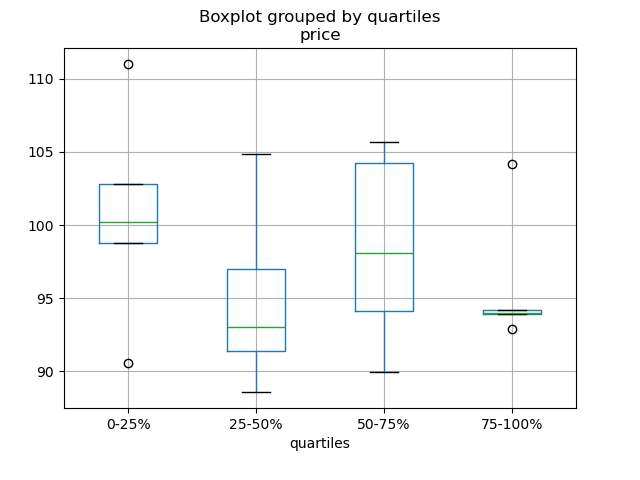
In [186]: df = pd.DataFrame(
   .....:     {
   .....:         "stratifying_var": np.random.uniform(0, 100, 20),
   .....:         "price": np.random.normal(100, 5, 20),
   .....:     }
   .....: )
   .....:

In [187]: df["quartiles"] = pd.qcut(
   .....:     df["stratifying_var"], 4, labels=["0-25%", "25-50%", "50-75%", "75-100%"]
   .....: )
   .....:

In [188]: df.boxplot(column="price", by="quartiles")
Out[188]: <Axes: title={'center': 'price'}, xlabel='quartiles'>
数据输入/输出#
CSV#
参见CSV文档
读取未通过 gzip/bz2 ( read_csv 识别的本地压缩格式) 压缩的文件。本例展示了 WinZipped 文件,但其通用应用是在上下文管理器中打开文件并使用该句柄进行读取。 点击此处查看
处理错误行 GH 2886
读取多个文件以创建单个 DataFrame#
将多个文件组合成一个 DataFrame 的最佳方法是逐个读取单独的数据框,将所有单独的数据框放入一个列表,然后使用 pd.concat() 组合列表中的数据框
In [189]: for i in range(3):
   .....:     data = pd.DataFrame(np.random.randn(10, 4))
   .....:     data.to_csv("file_{}.csv".format(i))
   .....:

In [190]: files = ["file_0.csv", "file_1.csv", "file_2.csv"]

In [191]: result = pd.concat([pd.read_csv(f) for f in files], ignore_index=True)
您可以使用相同的方法读取所有匹配模式的文件。这是一个使用 glob 的示例
In [192]: import glob

In [193]: import os

In [194]: files = glob.glob("file_*.csv")

In [195]: result = pd.concat([pd.read_csv(f) for f in files], ignore_index=True)
最后,此策略适用于 IO 文档中描述的其他 pd.read_*(...) 函数。
解析多列中的日期组件#
使用格式解析多列中的日期组件会更快
In [196]: i = pd.date_range("20000101", periods=10000)

In [197]: df = pd.DataFrame({"year": i.year, "month": i.month, "day": i.day})

In [198]: df.head()
Out[198]:
   year  month  day
0  2000      1    1
1  2000      1    2
2  2000      1    3
3  2000      1    4
4  2000      1    5

In [199]: %timeit pd.to_datetime(df.year * 10000 + df.month * 100 + df.day, format='%Y%m%d')
   .....: ds = df.apply(lambda x: "%04d%02d%02d" % (x["year"], x["month"], x["day"]), axis=1)
   .....: ds.head()
   .....: %timeit pd.to_datetime(ds)
   .....:
2.55 ms +- 315 us per loop (mean +- std. dev. of 7 runs, 100 loops each)
1.13 ms +- 10.1 us per loop (mean +- std. dev. of 7 runs, 1,000 loops each)
跳过标题和数据之间的行#
In [200]: data = """;;;;
   .....:  ;;;;
   .....:  ;;;;
   .....:  ;;;;
   .....:  ;;;;
   .....:  ;;;;
   .....: ;;;;
   .....:  ;;;;
   .....:  ;;;;
   .....: ;;;;
   .....: date;Param1;Param2;Param4;Param5
   .....:     ;m²;°C;m²;m
   .....: ;;;;
   .....: 01.01.1990 00:00;1;1;2;3
   .....: 01.01.1990 01:00;5;3;4;5
   .....: 01.01.1990 02:00;9;5;6;7
   .....: 01.01.1990 03:00;13;7;8;9
   .....: 01.01.1990 04:00;17;9;10;11
   .....: 01.01.1990 05:00;21;11;12;13
   .....: """
   .....:
选项 1: 显式传递行以跳过行#
In [201]: from io import StringIO

In [202]: pd.read_csv(
   .....:     StringIO(data),
   .....:     sep=";",
   .....:     skiprows=[11, 12],
   .....:     index_col=0,
   .....:     parse_dates=True,
   .....:     header=10,
   .....: )
   .....:
Out[202]:
                     Param1  Param2  Param4  Param5
date
1990-01-01 00:00:00       1       1       2       3
1990-01-01 01:00:00       5       3       4       5
1990-01-01 02:00:00       9       5       6       7
1990-01-01 03:00:00      13       7       8       9
1990-01-01 04:00:00      17       9      10      11
1990-01-01 05:00:00      21      11      12      13
选项 2: 先读取列名,然后读取数据#
In [203]: pd.read_csv(StringIO(data), sep=";", header=10, nrows=10).columns
Out[203]: Index(['date', 'Param1', 'Param2', 'Param4', 'Param5'], dtype='object')

In [204]: columns = pd.read_csv(StringIO(data), sep=";", header=10, nrows=10).columns

In [205]: pd.read_csv(
   .....:     StringIO(data), sep=";", index_col=0, header=12, parse_dates=True, names=columns
   .....: )
   .....:
Out[205]:
                     Param1  Param2  Param4  Param5
date
1990-01-01 00:00:00       1       1       2       3
1990-01-01 01:00:00       5       3       4       5
1990-01-01 02:00:00       9       5       6       7
1990-01-01 03:00:00      13       7       8       9
1990-01-01 04:00:00      17       9      10      11
1990-01-01 05:00:00      21      11      12      13
SQL#
参见SQL文档
Excel#
参见Excel文档
仅加载可见工作表 GH 19842#issuecomment-892150745
HTML#
HDFStore#
参见HDFStore文档
使用链接的多表层次结构管理异构数据 GH 3032
通过分块对大型存储进行去重,本质上是一种递归规约操作。展示了一个从 CSV 文件获取数据并按块创建存储的函数,并包含日期解析功能。 点击此处查看
对组密度低的 HDFStore 进行 `groupby` 操作
对组密度高的 HDFStore 进行 `groupby` 操作
将属性存储到组节点
In [206]: df = pd.DataFrame(np.random.randn(8, 3))

In [207]: store = pd.HDFStore("test.h5")

In [208]: store.put("df", df)

# you can store an arbitrary Python object via pickle
In [209]: store.get_storer("df").attrs.my_attribute = {"A": 10}

In [210]: store.get_storer("df").attrs.my_attribute
Out[210]: {'A': 10}
通过向 PyTables 传递 driver 参数,您可以在内存中创建或加载 HDFStore。更改仅在 HDFStore 关闭时写入磁盘。
In [211]: store = pd.HDFStore("test.h5", "w", driver="H5FD_CORE")

In [212]: df = pd.DataFrame(np.random.randn(8, 3))

In [213]: store["test"] = df

# only after closing the store, data is written to disk:
In [214]: store.close()
二进制文件#
如果需要读取由 C 结构体数组组成的二进制文件,pandas 可以轻松接受 NumPy 记录数组。例如,在 64 位机器上,给定名为 main.c 的文件中的 C 程序,并使用 gcc main.c -std=gnu99 编译,
#include <stdio.h>
#include <stdint.h>

typedef struct _Data
{
    int32_t count;
    double avg;
    float scale;
} Data;

int main(int argc, const char *argv[])
{
    size_t n = 10;
    Data d[n];

    for (int i = 0; i < n; ++i)
    {
        d[i].count = i;
        d[i].avg = i + 1.0;
        d[i].scale = (float) i + 2.0f;
    }

    FILE *file = fopen("binary.dat", "wb");
    fwrite(&d, sizeof(Data), n, file);
    fclose(file);

    return 0;
}
以下 Python 代码将把二进制文件 'binary.dat' 读取到 pandas DataFrame 中,其中结构体的每个元素对应于数据框中的一列
names = "count", "avg", "scale"

# note that the offsets are larger than the size of the type because of
# struct padding
offsets = 0, 8, 16
formats = "i4", "f8", "f4"
dt = np.dtype({"names": names, "offsets": offsets, "formats": formats}, align=True)
df = pd.DataFrame(np.fromfile("binary.dat", dt))
注意
结构体元素的偏移量可能因创建文件的机器架构而异。不建议使用这种原始二进制文件格式进行通用数据存储,因为它不跨平台。我们推荐使用 HDF5 或 parquet,这两种格式都受 pandas 的 IO 工具支持。
计算#
相关性#
通常,从 DataFrame.corr() 计算出的相关矩阵获得下(或上)三角形式很有用。这可以通过向 where 传递布尔掩码来实现,如下所示
In [215]: df = pd.DataFrame(np.random.random(size=(100, 5)))

In [216]: corr_mat = df.corr()

In [217]: mask = np.tril(np.ones_like(corr_mat, dtype=np.bool_), k=-1)

In [218]: corr_mat.where(mask)
Out[218]:
          0         1         2        3   4
0       NaN       NaN       NaN      NaN NaN
1 -0.079861       NaN       NaN      NaN NaN
2 -0.236573  0.183801       NaN      NaN NaN
3 -0.013795 -0.051975  0.037235      NaN NaN
4 -0.031974  0.118342 -0.073499 -0.02063 NaN
DataFrame.corr 中的 method 参数除了命名相关类型外,还可以接受一个可调用对象。这里我们计算 距离相关矩阵,用于 DataFrame 对象。
In [219]: def distcorr(x, y):
   .....:     n = len(x)
   .....:     a = np.zeros(shape=(n, n))
   .....:     b = np.zeros(shape=(n, n))
   .....:     for i in range(n):
   .....:         for j in range(i + 1, n):
   .....:             a[i, j] = abs(x[i] - x[j])
   .....:             b[i, j] = abs(y[i] - y[j])
   .....:     a += a.T
   .....:     b += b.T
   .....:     a_bar = np.vstack([np.nanmean(a, axis=0)] * n)
   .....:     b_bar = np.vstack([np.nanmean(b, axis=0)] * n)
   .....:     A = a - a_bar - a_bar.T + np.full(shape=(n, n), fill_value=a_bar.mean())
   .....:     B = b - b_bar - b_bar.T + np.full(shape=(n, n), fill_value=b_bar.mean())
   .....:     cov_ab = np.sqrt(np.nansum(A * B)) / n
   .....:     std_a = np.sqrt(np.sqrt(np.nansum(A ** 2)) / n)
   .....:     std_b = np.sqrt(np.sqrt(np.nansum(B ** 2)) / n)
   .....:     return cov_ab / std_a / std_b
   .....:

In [220]: df = pd.DataFrame(np.random.normal(size=(100, 3)))

In [221]: df.corr(method=distcorr)
Out[221]:
          0         1         2
0  1.000000  0.197613  0.216328
1  0.197613  1.000000  0.208749
2  0.216328  0.208749  1.000000
时间差#
参见时间差文档。
In [222]: import datetime

In [223]: s = pd.Series(pd.date_range("2012-1-1", periods=3, freq="D"))

In [224]: s - s.max()
Out[224]:
0   -2 days
1   -1 days
2    0 days
dtype: timedelta64[ns]

In [225]: s.max() - s
Out[225]:
0   2 days
1   1 days
2   0 days
dtype: timedelta64[ns]

In [226]: s - datetime.datetime(2011, 1, 1, 3, 5)
Out[226]:
0   364 days 20:55:00
1   365 days 20:55:00
2   366 days 20:55:00
dtype: timedelta64[ns]

In [227]: s + datetime.timedelta(minutes=5)
Out[227]:
0   2012-01-01 00:05:00
1   2012-01-02 00:05:00
2   2012-01-03 00:05:00
dtype: datetime64[ns]

In [228]: datetime.datetime(2011, 1, 1, 3, 5) - s
Out[228]:
0   -365 days +03:05:00
1   -366 days +03:05:00
2   -367 days +03:05:00
dtype: timedelta64[ns]

In [229]: datetime.timedelta(minutes=5) + s
Out[229]:
0   2012-01-01 00:05:00
1   2012-01-02 00:05:00
2   2012-01-03 00:05:00
dtype: datetime64[ns]
In [230]: deltas = pd.Series([datetime.timedelta(days=i) for i in range(3)])

In [231]: df = pd.DataFrame({"A": s, "B": deltas})

In [232]: df
Out[232]:
           A      B
0 2012-01-01 0 days
1 2012-01-02 1 days
2 2012-01-03 2 days

In [233]: df["New Dates"] = df["A"] + df["B"]

In [234]: df["Delta"] = df["A"] - df["New Dates"]

In [235]: df
Out[235]:
           A      B  New Dates   Delta
0 2012-01-01 0 days 2012-01-01  0 days
1 2012-01-02 1 days 2012-01-03 -1 days
2 2012-01-03 2 days 2012-01-05 -2 days

In [236]: df.dtypes
Out[236]:
A             datetime64[ns]
B            timedelta64[ns]
New Dates     datetime64[ns]
Delta        timedelta64[ns]
dtype: object
可以使用 `np.nan` 将值设置为 `NaT`,类似于日期时间
In [237]: y = s - s.shift()

In [238]: y
Out[238]:
0      NaT
1   1 days
2   1 days
dtype: timedelta64[ns]

In [239]: y[1] = np.nan

In [240]: y
Out[240]:
0      NaT
1      NaT
2   1 days
dtype: timedelta64[ns]
创建示例数据#
为了从给定值的每个组合创建数据框,例如 R 的 expand.grid() 函数,我们可以创建一个字典,其中键是列名,值是数据值列表
In [241]: def expand_grid(data_dict):
   .....:     rows = itertools.product(*data_dict.values())
   .....:     return pd.DataFrame.from_records(rows, columns=data_dict.keys())
   .....:

In [242]: df = expand_grid(
   .....:     {"height": [60, 70], "weight": [100, 140, 180], "sex": ["Male", "Female"]}
   .....: )
   .....:

In [243]: df
Out[243]:
    height  weight     sex
0       60     100    Male
1       60     100  Female
2       60     140    Male
3       60     140  Female
4       60     180    Male
5       60     180  Female
6       70     100    Male
7       70     100  Female
8       70     140    Male
9       70     140  Female
10      70     180    Male
11      70     180  Female
常量 Series#
要评估一个 Series 是否具有常量值,我们可以检查 series.nunique() <= 1。然而,一种更高效的方法,即不先计算所有唯一值的方法是
In [244]: v = s.to_numpy()

In [245]: is_constant = v.shape[0] == 0 or (s[0] == s).all()
此方法假定 Series 不包含缺失值。如果我们要删除 NA 值,我们可以简单地先删除这些值
In [246]: v = s.dropna().to_numpy()

In [247]: is_constant = v.shape[0] == 0 or (s[0] == s).all()
如果缺失值被认为是与其他任何值都不同的,那么可以使用
In [248]: v = s.to_numpy()

In [249]: is_constant = v.shape[0] == 0 or (s[0] == s).all() or not pd.notna(v).any()
(请注意,此示例未区分 np.nan、pd.NA 和 None)